 DayPilot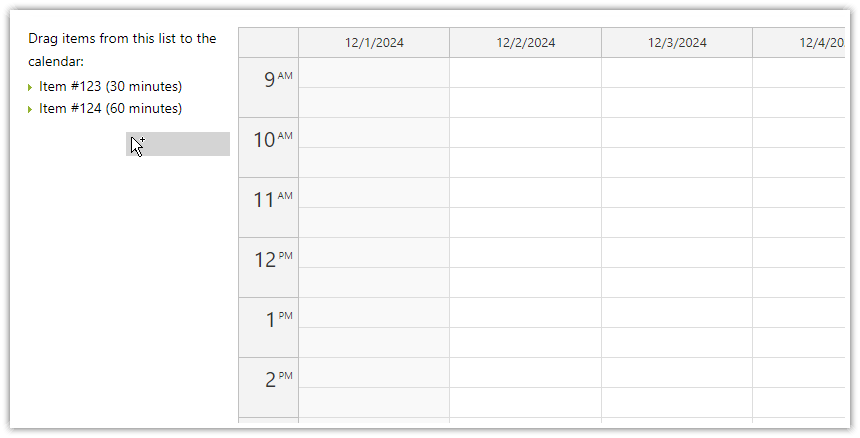
The JavaScript Calendar component supports drag & drop of items from an external source (from outside of the calendar control).
This feature is useful for implementing the following scenario:
The calendar shows current time schedule.
Separate list of events that are not yet scheduled.
The unscheduled events can be dragged to the calendar.
Drag Source
It is necessary to activate the source elements using the DayPilot.Calendar.makeDraggable() method:
<div id="external-event" data-id="1" data-duration="30">External event</div>

<script>

const e = document.getElementById("external-event");

const item = {
  element: e,
  data: {
    id: e.getAttribute("data-id"),
    text: e.innerText,
    duration: e.getAttribute("data-duration")*60; // convert minutes to seconds
  }
};
DayPilot.Calendar.makeDraggable(item);

</script>
After dropping the object in the Calendar as an event, the standard onEventMove event is triggered. You can detect the external source by checking the args.external variable. This property is set to true is the event was dragged from an external source.
onEventMove: args => {
  if (args.external) {
    console.log("External drag source detected");
  }
}
See also
ASP.NET WebForms
EventMoveJavaScript="if (external) { alert('External drag&drop detected.'); }
dpc1.eventMoveCallBack(e, newStart, newEnd, oldColumn, newColumn);"
Demo
See also
Drag & drop from a TextBox or Grid (DayPilot Forums)
Drag & drop with dynamic events (DayPilot Forums)
Say we have drag & drop component ... (DayPilot Forums)
ASP.NET MVC
External drag&drop can be detected using "external" variable:
EventMoveJavaScript="if (external) { alert('external source detected'); } dpc.eventMoveCallBack(e, newStart, newEnd);"See also:
DayPilot.Calendar.onEventMove (client-side API)
DayPilot.Calendar.eventMoveCallBack (client-side API)
Availability
Availability of this feature in DayPilot editions:
| Lite | Pro | |
|---|---|---|
| DayPilot for JavaScript | ||
| DayPilot for ASP.NET WebForms | ||
| DayPilot for ASP.NET MVC | ||
| DayPilot for Java |