 DayPilot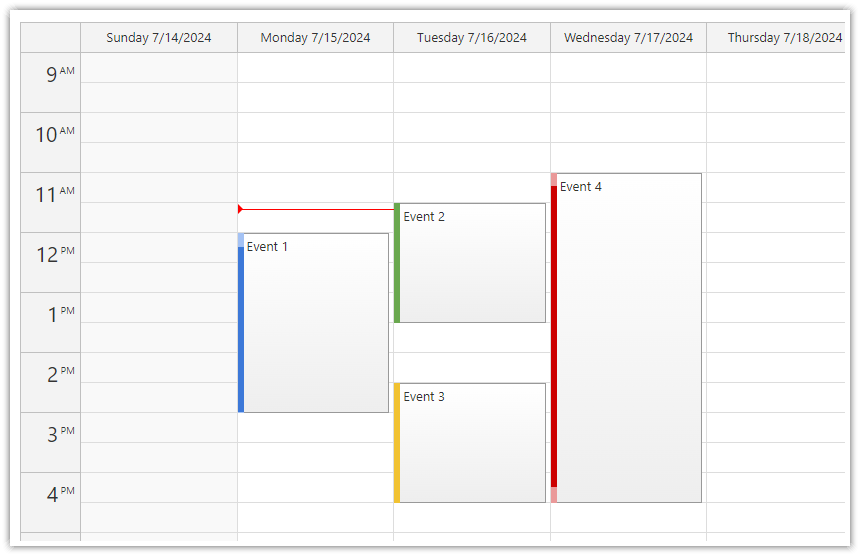
The first day of week in the week view can be set using the weekStarts property.
Possible values:
a number representing the day of week (
0= Sunday,1= Monday,2= Tuesday,3= Wednesday,4= Thursday,5= Friday,6= Saturday)"Auto"(default)
The automatic mode uses the current locale to determine the first day of week.
JavaScript
In the JavaScript Calendar component, use the weekStarts property to set the first day of week:
<div id="calendar"></div>
<script>
  const calendar = new DayPilot.Calendar("calendar", {
    weekStarts: 0, // Sunday
    // ...
  });
  calendar.init();
</script>
ASP.NET WebForms
<DayPilot:DayPilotCalendar runat="server" id="DayPilotCalendar1"
  ...
  WeekStarts = "Sunday"
/>
ASP.NET MVC
@Html.DayPilotCalendar("dps", new DayPilotCalendarConfig {
  BackendUrl = ResolveUrl("~/Calendar/Backend"),
  ...
  WeekStarts = WeekStarts.Sunday
})
Availability
Availability of this feature in DayPilot editions:
| Lite | Pro | |
|---|---|---|
| DayPilot for JavaScript | ||
| DayPilot for ASP.NET WebForms | ||
| DayPilot for ASP.NET MVC | ||
| DayPilot for Java |