 DayPilot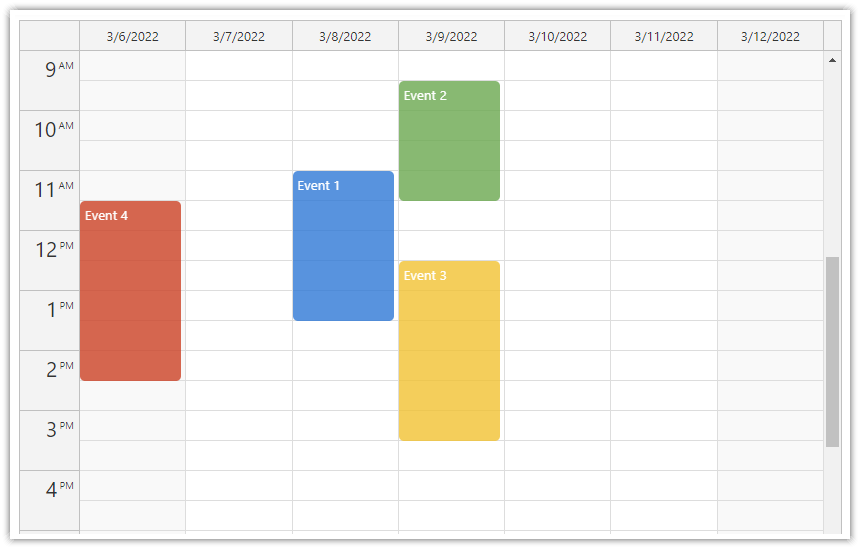
React Calendar is a UI component that lets you add calendar and scheduling functionality to your React application.
Create daily or weekly calendar views
Display a custom number of days as columns in the calendar
Customize the appearance using CSS
Create, move and resize events using drag and drop
Delete events using a built-in icon
Easily switch the visible date using a React date picker component
Define your own business hours
Translate the calendar automatically by setting a custom locale
Show resources as columns instead of days
Selected advanced features of the Pro version:
Display a large number of columns with a fixed width and access them using a horizontal scrollbar
Group resource headers in a hierarchy of columns
Display large event data sets - events are rendered progressively as users scroll
Allow overnight schedules (set custom start and end hour for the vertical axis)
Export the calendar as image (JPG, PNG, BMP) or document (PDF)
Use the calendar on mobile devices with touch support
The calendar can display all-day events in a special column header row
For a timeline view with date/time on the horizontal axis and resources on the vertical axis, see the React Scheduler component.
Open-Source Tutorials
React
React Weekly Calendar Tutorial (Open-Source)
A React project with week view calendar, drag and drop support, custom event CSS, and a date picker.React Resource Calendar with Editable Columns (Open-Source)
How to use the React calendar component to create a scheduling application for multiple groups of resources (locations, people, tools). The resources are displayed as columns.React Calendar with Day/Week/Month Views (Open-Source)
How to create a complex calendar component that displays integrated daily, weekly and monthly calendars in React.
Next.js
Next.js Weekly Calendar (Open-Source)
How to add a weekly calendar component to your Next.js application.
Tutorials
See all React Calendar and Scheduler Tutorials.
React Calendar Package
DayPilot Lite (Open-Source)
The open-source version of the React Calendar component is available in DayPilot Lite for React (@daypilot/daypilot-lite-react).
npm install @daypilot/daypilot-lite-reactDayPilot Pro
You can get the daypilot-pro-react module at npm.daypilot.org:
npm install https://npm.daypilot.org/daypilot-pro-react/trial/2024.2.5957.tar.gzReact Event Calendar Component

The React event calendar component is available using <DayPilotCalendar> tag:
import React from 'react';

// DayPilot Lite
// import {DayPilotCalendar} from "@daypilot/daypilot-lite-react";

// DayPilot Pro
import {DayPilotCalendar} from "daypilot-pro-react";

const Calendar = () => {
    return (
        <DayPilotCalendar />
    );
}

export default Calendar;
React Calendar Configuration

You can use all standard DayPilot.Calendar properties and events with the React calendar component:
import React from 'react';

// DayPilot Lite
// import {DayPilotCalendar} from "@daypilot/daypilot-lite-react";

// DayPilot Pro
import {DayPilotCalendar} from "daypilot-pro-react";

const Calendar = () => {
    return (
        <DayPilotCalendar
          viewType="Week"
        />
    );
}

export default Calendar;
Accessing DayPilot.Calendar Object

In order to invoke the calendar component methods, it's necessary to get a DayPilot.Calendar object reference. You can do that using the controlRef attribute:
import React, { useState } from 'react';

// DayPilot Lite
// import { DayPilotCalendar } from "@daypilot/daypilot-lite-react";

// DayPilot Pro
import { DayPilotCalendar } from 'daypilot-pro-react';

const Calendar = () => {
  const [calendar, setCalendar] = useState();

  return (
    <div>
      <DayPilotCalendar viewType={'Week'} controlRef={setCalendar} />
    </div>
  );
};

export default Calendar;
The DayPilot.Calendar object is now accessible using the calendar state variable. You can use it to invoke the DayPilot.Calendar class methods:
import React, { useState } from 'react';

// DayPilot Lite
// import { DayPilotCalendar } from "@daypilot/daypilot-lite-react";

// DayPilot Pro
import { DayPilot, DayPilotCalendar } from 'daypilot-pro-react';

const Calendar = () => {
  const [calendar, setCalendar] = useState();

  return (
    <div>
      <DayPilotCalendar
        viewType={"Week"}
        onTimeRangeSelected={args => {
          const e = {
            start: args.start,
            end: args.end,
            id: DayPilot.guid(),
            text: "Event"
          };
          calendar.events.add(e);
          calendar.clearSelection();
        }}
        controlRef={setCalendar}
      />
    </div>
  );
}

export default Calendar;
Availability
Availability of this feature in DayPilot editions:
| Lite | Pro | |
|---|---|---|
| DayPilot for JavaScript | ||
| DayPilot for ASP.NET WebForms | ||
| DayPilot for ASP.NET MVC | ||
| DayPilot for Java |