 DayPilot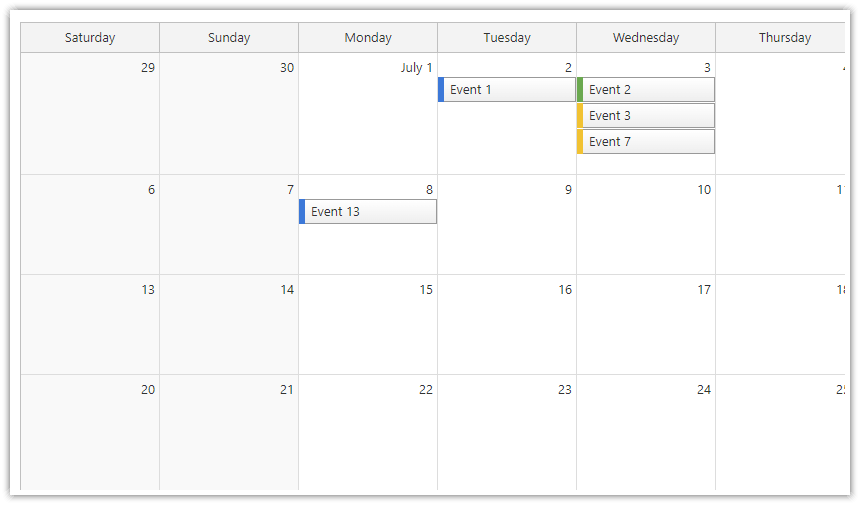
By default, the first day of week displayed by the JavaScript Monthly Calendar is set automaticaly, using the current locale.
You can also set it manually using the weekStarts property:
Calendar config:
const month = new DayPilot.Month("month", {
  weekStarts: 6,  // Saturday
  // ...
});
ASP.NET WebForms
The first day of week can be set using WeekStarts property.
Possible values:
Monday
Tuesday
Wednesday
Thursday
Friday
Saturday
Sunday
Auto (default)
The automatic mode uses the current culture to determine the first day of week.
<DayPilot:DayPilotMonth runat="server" id="DayPilotMonth1"
  ...
  WeekStarts = "Sunday"
/>
ASP.NET MVC
@Html.DayPilotMonth("dpm", new DayPilotMonthConfig {
  BackendUrl = ResolveUrl("~/Month/Backend"),
  ...
  WeekStarts = WeekStarts.Sunday
})
Availability
Availability of this feature in DayPilot editions:
| Lite | Pro | |
|---|---|---|
| DayPilot for JavaScript | ||
| DayPilot for ASP.NET WebForms | ||
| DayPilot for ASP.NET MVC | ||
| DayPilot for Java |