 DayPilot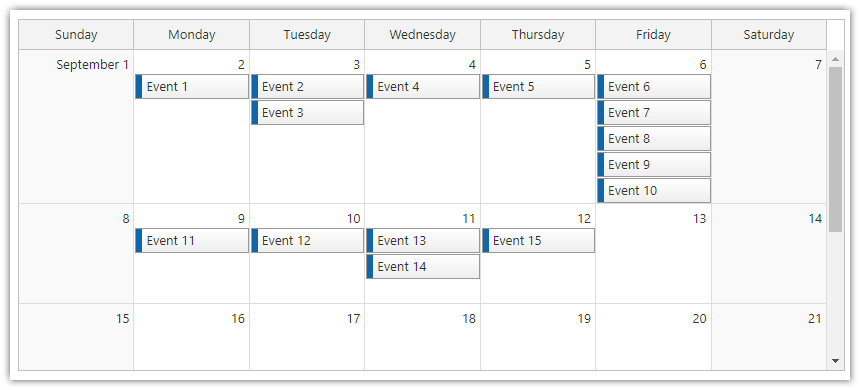
The monthly calendar supports several options for setting the component height. The mode can be set using the heightSpec property.
Supported values:
Auto (default)
Fixed
Parent100Pct
Auto
Height: Calculated automatically to show all weeks.
Scrollbar: hidden
Fixed
Height: Specified in Height property (pixels).
Scrollbar: visible
Parent100Pct
Height: 100% of the parent element.
Scrollbar: visible
See also 100% height.
JavaScript
<div id="dp"></div>
<script type="text/javascript">
  var dp = new DayPilot.Month("dp");
  dp.heightSpec = "Fixed";
  dp.height = 400
  // ...
  dp.init();
</script>
ASP.NET WebForms
<DayPilot:DayPilotMonth runat="server" id="DayPilotMonth1"
  ...
  HeightSpec = "Fixed"
  Height="400"
/>
ASP.NET MVC
@Html.DayPilotMonth("dpm", new DayPilotMonthConfig {
  BackendUrl = ResolveUrl("~/Month/Backend"),
  ...
  HeightSpec = HeightSpec.BusinessHours,
  Height = 400
})
Java
<div id="dp"></div>
<script type="text/javascript">
  var dp = new DayPilot.Month("dp");
  dp.backendUrl = "${pageContext.request.contextPath}/dpm";
  dp.heightSpec = "Fixed";
  dp.height = 400;
  // ...
  dp.init();
</script>
Availability
Availability of this feature in DayPilot editions:
| Lite | Pro | |
|---|---|---|
| DayPilot for JavaScript | ||
| DayPilot for ASP.NET WebForms | ||
| DayPilot for ASP.NET MVC | ||
| DayPilot for Java |