 DayPilot
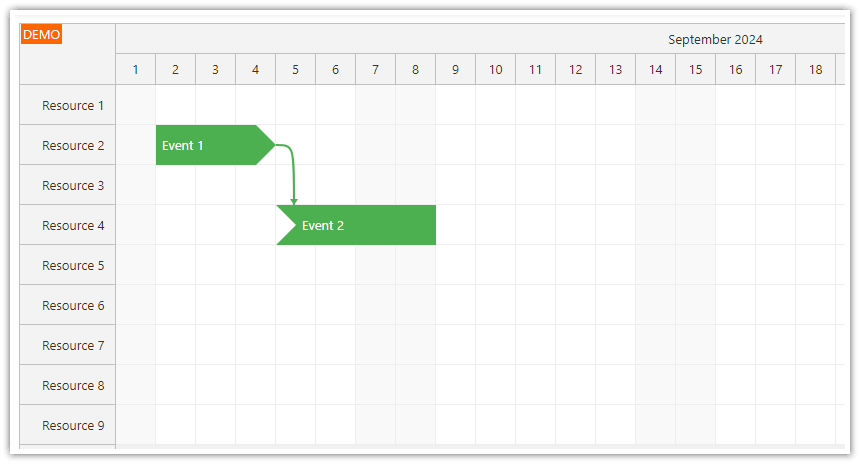
The Scheduler component can display links between two events. You can use the links to highlight dependencies between tasks or join related events visually.
Both endpoint events must be loaded. Links can connect events outside the current timeline range; the visible portion is drawn when its route intersects the displayed grid.
You can specify where the link will start and end (event start/end). The following link types are supported: StartToStart, StartToFinish, FinishToStart, FinishToFinish.
A link connecting two adjacent events (FinishToStart) will be displayed as a dot.
You can customize the link appearance (color, style, layer and CSS).
You can display additional information about a link on hover using a bubble.
Users can perform link-related actions using a context menu.
You can enable drag and drop link adding.
Documentation:
JavaScript Scheduler
Demo
Tutorials
ASP.NET Core Field Service Scheduling: Tasks, Routes, and Travel Time
Machine/Production Job Scheduling Web Application (Spring/Java)
Styling Linked Events
JavaScript Scheduler: Styling Linked Events
This tutorial explains how to style events based on whether there are links pointing to or from them. In this example, the event styling shows an event continuing on another row (resource).
API: links.list.
The examples connect Planning to Delivery with a FinishToStart link. Both events and their rows are included. A link draws the relationship; application logic determines the task dates.
The framework examples use DayPilot Pro. For installation, see the Angular, React or Vue Scheduler guide.
Angular
Supply the initial dependency through config.links, alongside the event and resource collections.
import {Component} from "@angular/core";
import {DayPilot, DayPilotModule} from "daypilot-pro-angular";

@Component({
  selector: "app-scheduler-example",
  standalone: true,
  imports: [DayPilotModule],
  template: `

    <daypilot-scheduler [config]="config"></daypilot-scheduler>
  `
})
export class SchedulerExampleComponent {
  config: DayPilot.SchedulerConfig = {
    startDate: "2026-11-01",
    days: 30,
    scale: "Day",
    timeHeaders: [{groupBy: "Month"}, {groupBy: "Day", format: "d"}],
    resources: [{id: "A", name: "Room A"}, {id: "B", name: "Room B"}],
    events: [{id: 1, text: "Planning", resource: "A", start: "2026-11-03", end: "2026-11-06"}, {id: 2, text: "Delivery", resource: "B", start: "2026-11-08", end: "2026-11-11"}],
    links: [{id: "L1", from: 1, to: 2, type: "FinishToStart"}]
  };

}
Angular Scheduler: Event Links
React
The Scheduler receives the dependency array through its
linksprop, independently of theeventsandresourcesprops.import React from "react"; import {DayPilot, DayPilotScheduler} from "daypilot-pro-react"; export default function SchedulerExample() { return <div> <DayPilotScheduler startDate={"2026-11-01"} days={30} scale={"Day"} timeHeaders={[{groupBy: "Month"}, {groupBy: "Day", format: "d"}]} resources={[{id: "A", name: "Room A"}, {id: "B", name: "Room B"}]} events={[{id: 1, text: "Planning", resource: "A", start: "2026-11-03", end: "2026-11-06"}, {id: 2, text: "Delivery", resource: "B", start: "2026-11-08", end: "2026-11-11"}]} links={[{id: "L1", from: 1, to: 2, type: "FinishToStart"}]} /> </div>; }
-
Vue
Declare the link collection in
<script setup>and pass it with:links="links".<script setup> import {DayPilot, DayPilotScheduler} from "daypilot-pro-vue"; const startDate = "2026-11-01"; const days = 30; const scale = "Day"; const timeHeaders = [{groupBy: "Month"}, {groupBy: "Day", format: "d"}]; const resources = [{id: "A", name: "Room A"}, {id: "B", name: "Room B"}]; const events = [{id: 1, text: "Planning", resource: "A", start: "2026-11-03", end: "2026-11-06"}, {id: 2, text: "Delivery", resource: "B", start: "2026-11-08", end: "2026-11-11"}]; const links = [{id: "L1", from: 1, to: 2, type: "FinishToStart"}]; </script> <template> <div> <DayPilotScheduler :startDate="startDate" :days="days" :scale="scale" :timeHeaders="timeHeaders" :resources="resources" :events="events" :links="links" /> </div> </template>ASP.NET MVC
protected override void OnInit(InitArgs ea)
{
  Links = new LinkCollection();
  links.Add("6", "16");  // link from Event 6 to Event 16

  // ...
}
Availability
Availability of this feature in DayPilot editions:
Product Lite Pro DayPilot for JavaScript DayPilot for ASP.NET WebForms DayPilot for ASP.NET MVC DayPilot for Java
-