 DayPilot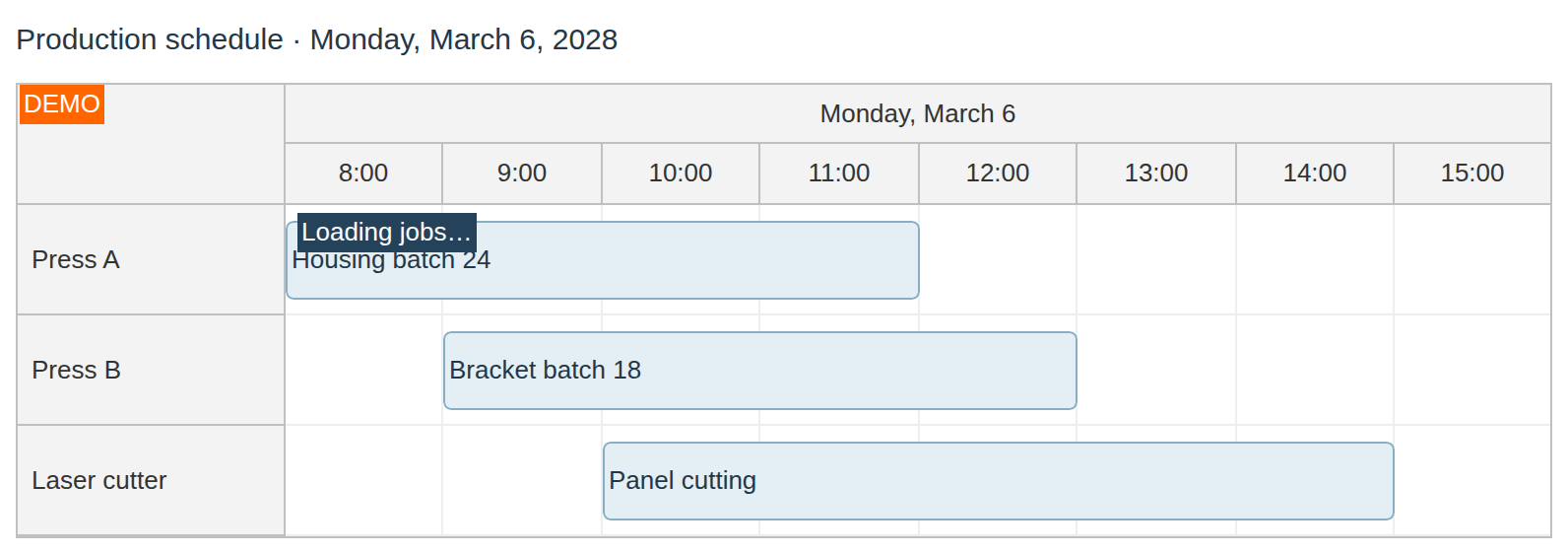
A "Loading..." label is displayed in the upper-left corner whenever a CallBack takes more than 100 ms (ASP.NET WebForms, ASP.NET MVC, Java).
JavaScript
In the JavaScript version, you can display the label using loadingStart() method (e.g. when invoking an HTTP request) and hide it using loadingStop() (when the HTTP response is received).
API: loadingLabelText.
Each Reload reservations button requests a JSON event array from /api/events. The handler starts the loading label before the request and stops it in finally, including when loading fails.
The framework examples use DayPilot Pro. For installation, see the Angular, React or Vue Scheduler guide.
Angular
Configure loadingLabelText in config. The asynchronous click method uses this.scheduler.control for the label and event update.
import {Component, ViewChild} from "@angular/core";
import {DayPilot, DayPilotModule, DayPilotSchedulerComponent} from "daypilot-pro-angular";

@Component({
  selector: "app-scheduler-example",
  standalone: true,
  imports: [DayPilotModule],
  template: `
    <button (click)="action0()">Reload reservations</button>
    <daypilot-scheduler [config]="config" #scheduler></daypilot-scheduler>
  `
})
export class SchedulerExampleComponent {
  @ViewChild("scheduler") scheduler!: DayPilotSchedulerComponent;
  config: DayPilot.SchedulerConfig = {
    startDate: "2026-11-01",
    days: 30,
    scale: "Day",
    timeHeaders: [{groupBy: "Month"}, {groupBy: "Day", format: "d"}],
    resources: [{id: "A", name: "Room A"}, {id: "B", name: "Room B"}],
    events: [{id: 1, text: "Planning", resource: "A", start: "2026-11-03", end: "2026-11-06"}, {id: 2, text: "Delivery", resource: "B", start: "2026-11-08", end: "2026-11-11"}],
    loadingLabelText: "Loading reservations..."
  };
  async action0() {
    const dp = this.scheduler.control;
    dp.loadingStart();
    try {
      const {data} = await DayPilot.Http.get("/api/events?start=2026-11-01&end=2026-12-01");
      dp.update({events: data});
    } catch { await DayPilot.Modal.alert("Could not load reservations."); }
    finally { dp.loadingStop(); }
  }
}
React
Pass loadingLabelText as a prop and capture the control with controlRef; the asynchronous button handler uses that ref throughout the request.
import React, {useRef} from "react";
import {DayPilot, DayPilotScheduler} from "daypilot-pro-react";

export default function SchedulerExample() {
  const scheduler = useRef(null);
  async function action0() {
    const dp = scheduler.current;
    dp.loadingStart();
    try {
      const {data} = await DayPilot.Http.get("/api/events?start=2026-11-01&end=2026-12-01");
      dp.update({events: data});
    } catch { await DayPilot.Modal.alert("Could not load reservations."); }
    finally { dp.loadingStop(); }
  }
  return <div>
    <button onClick={action0}>Reload reservations</button>
    <DayPilotScheduler
      controlRef={control => { scheduler.current = control; }}
      startDate={"2026-11-01"}
      days={30}
      scale={"Day"}
      timeHeaders={[{groupBy: "Month"}, {groupBy: "Day", format: "d"}]}
      resources={[{id: "A", name: "Room A"}, {id: "B", name: "Room B"}]}
      events={[{id: 1, text: "Planning", resource: "A", start: "2026-11-03", end: "2026-11-06"}, {id: 2, text: "Delivery", resource: "B", start: "2026-11-08", end: "2026-11-11"}]}
      loadingLabelText={"Loading reservations..."}
    />
  </div>;
}
Vue
Bind :loadingLabelText and give the Scheduler a template ref. The @click function accesses loading methods through scheduler.value.control.
<script setup>
import {ref} from "vue";
import {DayPilot, DayPilotScheduler} from "daypilot-pro-vue";

const scheduler = ref(null);
const startDate = "2026-11-01";
const days = 30;
const scale = "Day";
const timeHeaders = [{groupBy: "Month"}, {groupBy: "Day", format: "d"}];
const resources = [{id: "A", name: "Room A"}, {id: "B", name: "Room B"}];
const events = [{id: 1, text: "Planning", resource: "A", start: "2026-11-03", end: "2026-11-06"}, {id: 2, text: "Delivery", resource: "B", start: "2026-11-08", end: "2026-11-11"}];
const loadingLabelText = "Loading reservations...";
async function action0() {
  const dp = scheduler.value.control;
  dp.loadingStart();
  try {
    const {data} = await DayPilot.Http.get("/api/events?start=2026-11-01&end=2026-12-01");
    dp.update({events: data});
  } catch { await DayPilot.Modal.alert("Could not load reservations."); }
  finally { dp.loadingStop(); }
}
</script>

<template>
  <div>
    <button @click="action0">Reload reservations</button>
    <DayPilotScheduler ref="scheduler"
      :startDate="startDate"
      :days="days"
      :scale="scale"
      :timeHeaders="timeHeaders"
      :resources="resources"
      :events="events"
      :loadingLabelText="loadingLabelText"
    />
  </div>
</template>
Styling
The styles are defined using *_loading CSS class in the theme. See also CSS Classes.
ASP.NET WebForms
The loading label is enabled by default (LoadingLabelVisible is set to true).
Custom HTML
You can override the Loading label HTML using LoadingLabelText property.
Availability
Availability of this feature in DayPilot editions:
| Product | Lite | Pro |
|---|---|---|
| DayPilot for JavaScript | ||
| DayPilot for ASP.NET WebForms | ||
| DayPilot for ASP.NET MVC | ||
| DayPilot for Java |