 DayPilot
If you use left-aligned or centered text in long time header cells (especially month and year time header groups) the text can get hidden during scrolling (when the beginning of the time header cell scrolls out of the viewport):
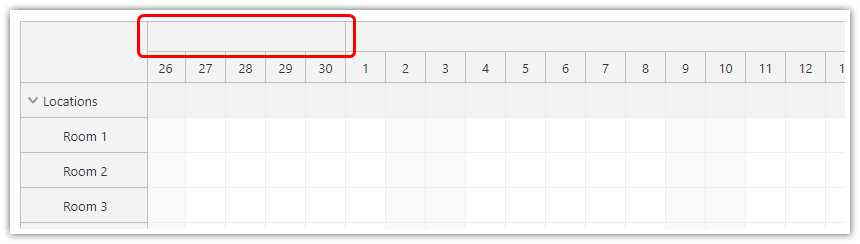
The Scheduler can keep the label inside the visible part of the time header cell:
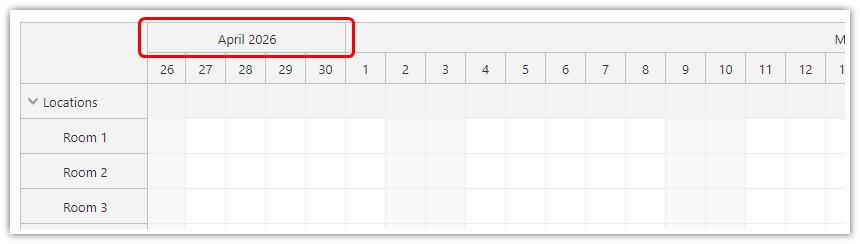
You can specify the style of the floating div using *_timeheader_float and *_timeheader_float_inner classes.
Example:
.scheduler_default_timeheadergroup, .scheduler_default_timeheadercol {
  text-align: center;
}
The floating label inherits text-align: center style from the parent .scheduler_default_timeheadergroup and .scheduler_default_timeheadercol classes.
Notes:
Floating time headers are enabled by default. You can enable/disable this behavior using floatingTimeHeaders property.
All CSS themes are updated to support floating time headers. The themes created using the online theme designer support the floating time headers as well.
Custom Header Content
Custom DOM, Angular, React and Vue content follows the visible part of the header in the same way as ordinary labels. See Time Header Customization for framework examples.
A positive scrollDelayFloats value makes existing labels wait until scrolling pauses before following the scroll position. The default 0 keeps them moving immediately.
API: floatingTimeHeaders.
The examples display a 365-day timeline with year, month and day headers. Scroll horizontally to see the long header labels stay within their visible cells.
The framework examples use DayPilot Pro. For installation, see the Angular, React or Vue Scheduler guide.
Angular
import {Component} from "@angular/core";
import {DayPilot, DayPilotModule} from "daypilot-pro-angular";

@Component({
  selector: "app-scheduler-example",
  standalone: true,
  imports: [DayPilotModule],
  template: `

    <daypilot-scheduler [config]="config"></daypilot-scheduler>
  `
})
export class SchedulerExampleComponent {
  config: DayPilot.SchedulerConfig = {
    startDate: "2026-11-01",
    days: 365,
    scale: "Day",
    timeHeaders: [{groupBy: "Year"}, {groupBy: "Month"}, {groupBy: "Day", format: "d"}],
    resources: [{id: "A", name: "Room A"}, {id: "B", name: "Room B"}],
    events: [{id: 1, text: "Planning", resource: "A", start: "2026-11-03", end: "2026-11-06"}, {id: 2, text: "Delivery", resource: "B", start: "2026-11-08", end: "2026-11-11"}],
    floatingTimeHeaders: true
  };

}
React
import React from "react";
import {DayPilot, DayPilotScheduler} from "daypilot-pro-react";

export default function SchedulerExample() {

  return <div>

    <DayPilotScheduler
      startDate={"2026-11-01"}
      days={365}
      scale={"Day"}
      timeHeaders={[{groupBy: "Year"}, {groupBy: "Month"}, {groupBy: "Day", format: "d"}]}
      resources={[{id: "A", name: "Room A"}, {id: "B", name: "Room B"}]}
      events={[{id: 1, text: "Planning", resource: "A", start: "2026-11-03", end: "2026-11-06"}, {id: 2, text: "Delivery", resource: "B", start: "2026-11-08", end: "2026-11-11"}]}
      floatingTimeHeaders={true}
    />
  </div>;
}
Vue
<script setup>
import {DayPilot, DayPilotScheduler} from "daypilot-pro-vue";

const startDate = "2026-11-01";
const days = 365;
const scale = "Day";
const timeHeaders = [{groupBy: "Year"}, {groupBy: "Month"}, {groupBy: "Day", format: "d"}];
const resources = [{id: "A", name: "Room A"}, {id: "B", name: "Room B"}];
const events = [{id: 1, text: "Planning", resource: "A", start: "2026-11-03", end: "2026-11-06"}, {id: 2, text: "Delivery", resource: "B", start: "2026-11-08", end: "2026-11-11"}];
const floatingTimeHeaders = true;

</script>

<template>
  <div>

    <DayPilotScheduler
      :startDate="startDate"
      :days="days"
      :scale="scale"
      :timeHeaders="timeHeaders"
      :resources="resources"
      :events="events"
      :floatingTimeHeaders="floatingTimeHeaders"
    />
  </div>
</template>
Availability
Availability of this feature in DayPilot editions:
| Product | Lite | Pro |
|---|---|---|
| DayPilot for JavaScript | ||
| DayPilot for ASP.NET WebForms | ||
| DayPilot for ASP.NET MVC | ||
| DayPilot for Java |