 DayPilot
You can set the scheduler cell duration using the scale property.
Possible values (DayPilot Pro):
"Minute""Hour""Day""Week""Month""Quarter""Year""CellDuration"- a custom number of minutes (cell duration)"Manual"- a custom timeline created by specifying the individual cells
Possible values (DayPilot Lite):
"Minute""Hour""Day""Week""CellDuration"- a custom number of minutes (cell duration)
The default value is "CellDuration".
Remember to set the time header rows accordingly when changing the Scheduler grid scale.
JavaScript Scheduler
15-Minute Blocks
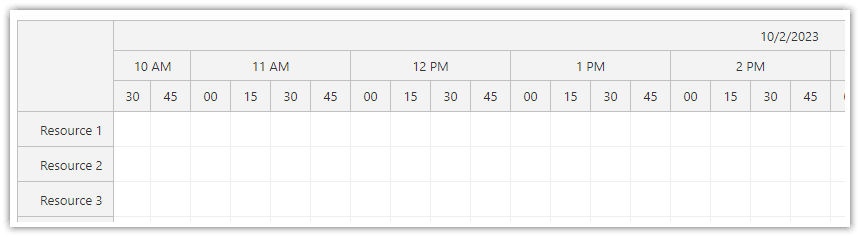
Scheduler config:
{
  scale: "CellDuration",
  cellDuration: 15,
  timeHeaders: [
    { groupBy: "Day", format: "M/d/yyyy"},
    { groupBy: "Hour" },
    { groupBy: "Cell", format: "mm" }
  ],
  // ...
}
Hours
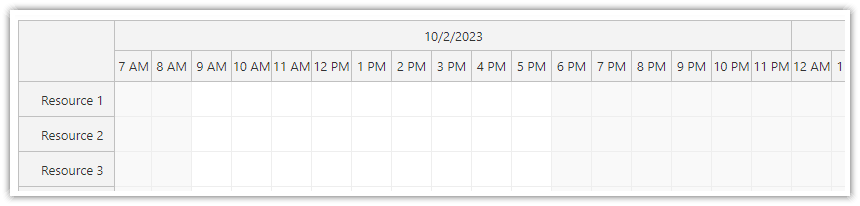
Scheduler configuration:
{
  scale: "Hour",
  timeHeaders: [
    { groupBy: "Day", format: "M/d/yyyy"},
    { groupBy: "Hour" }
  ],
  // ...
}
Days
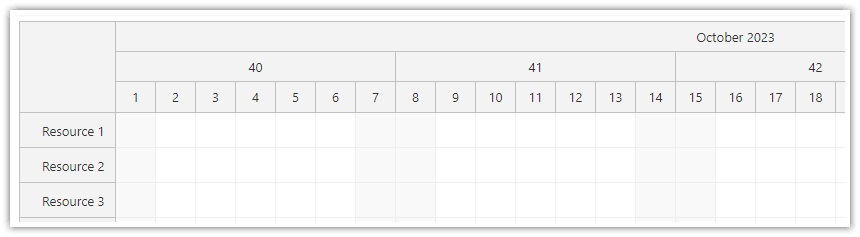
Scheduler configuration:
{
  scale: "Day",
  timeHeaders: [
    { groupBy: "Month", format: "MMMM yyyy"},
    { groupBy: "Week"},
    { groupBy: "Day", format: "d" }
  ],
  // ...
}
Weeks
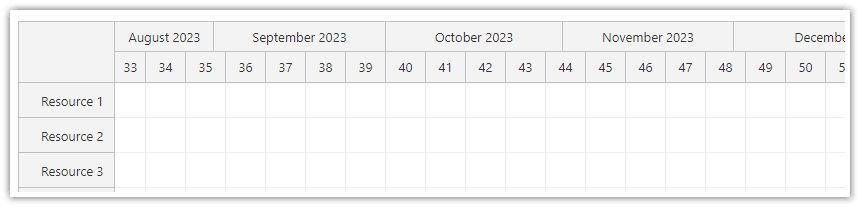
Scheduler configuration:
{
  scale: "Week",
  timeHeaders: [
    { groupBy: "Month", format: "MMMM yyyy"},
    { groupBy: "Week" }
  ],
  // ...
}
Months
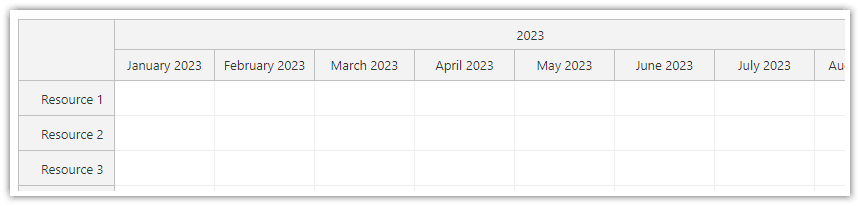
Scheduler configuration:
{
  scale: "Month",
  timeHeaders: [
    { groupBy: "Year"},
    { groupBy: "Month" }
  ],
  // ...
}
Years
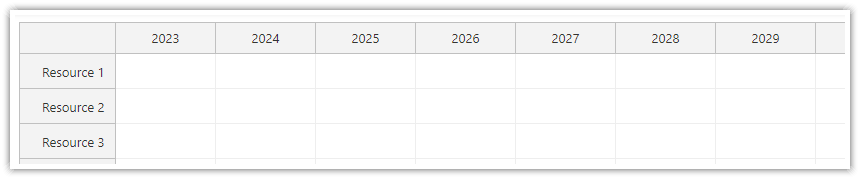
{
  scale: "Year",
  timeHeaders: [
    { groupBy: "Year"},
  ],
  // ...
}
Tutorials
API: cellDuration.
The examples use scale: "CellDuration" with 15-minute cells. Three header rows show the day, hour and minute within each cell.
The framework examples use DayPilot Pro. For installation, see the Angular, React or Vue Scheduler guide.
Angular
import {Component} from "@angular/core";
import {DayPilot, DayPilotModule} from "daypilot-pro-angular";

@Component({
  selector: "app-scheduler-example",
  standalone: true,
  imports: [DayPilotModule],
  template: `

    <daypilot-scheduler [config]="config"></daypilot-scheduler>
  `
})
export class SchedulerExampleComponent {
  config: DayPilot.SchedulerConfig = {
    startDate: "2026-11-03",
    days: 1,
    scale: "CellDuration",
    timeHeaders: [{groupBy: "Day"}, {groupBy: "Hour"}, {groupBy: "Cell", format: "mm"}],
    resources: [{id: "A", name: "Room A"}, {id: "B", name: "Room B"}],
    events: [{id: 1, text: "Planning", resource: "A", start: "2026-11-03T09:00:00", end: "2026-11-03T12:00:00"}],
    cellDuration: 15
  };

}
React
import React from "react";
import {DayPilot, DayPilotScheduler} from "daypilot-pro-react";

export default function SchedulerExample() {

  return <div>

    <DayPilotScheduler
      startDate={"2026-11-03"}
      days={1}
      scale={"CellDuration"}
      timeHeaders={[{groupBy: "Day"}, {groupBy: "Hour"}, {groupBy: "Cell", format: "mm"}]}
      resources={[{id: "A", name: "Room A"}, {id: "B", name: "Room B"}]}
      events={[{id: 1, text: "Planning", resource: "A", start: "2026-11-03T09:00:00", end: "2026-11-03T12:00:00"}]}
      cellDuration={15}
    />
  </div>;
}
Vue
<script setup>
import {DayPilot, DayPilotScheduler} from "daypilot-pro-vue";

const startDate = "2026-11-03";
const days = 1;
const scale = "CellDuration";
const timeHeaders = [{groupBy: "Day"}, {groupBy: "Hour"}, {groupBy: "Cell", format: "mm"}];
const resources = [{id: "A", name: "Room A"}, {id: "B", name: "Room B"}];
const events = [{id: 1, text: "Planning", resource: "A", start: "2026-11-03T09:00:00", end: "2026-11-03T12:00:00"}];
const cellDuration = 15;

</script>

<template>
  <div>

    <DayPilotScheduler
      :startDate="startDate"
      :days="days"
      :scale="scale"
      :timeHeaders="timeHeaders"
      :resources="resources"
      :events="events"
      :cellDuration="cellDuration"
    />
  </div>
</template>
ASP.NET WebForms
Hours

<DayPilot:DayPilotScheduler
  ID="DayPilotScheduler1"
  runat="server"
  ...
  Scale="Hour"
  />
Days

<DayPilot:DayPilotScheduler
  ID="DayPilotScheduler1"
  runat="server"
  ...
  Scale="Day"
  />
Weeks

<DayPilot:DayPilotScheduler
  ID="DayPilotScheduler1"
  runat="server"
  ...
  Scale="Week"
  />
Months

<DayPilot:DayPilotScheduler
  ID="DayPilotScheduler1"
  runat="server"
  ...
  Scale="Month"
  />
Years

<DayPilot:DayPilotScheduler
  ID="DayPilotScheduler1"
  runat="server"
  ...
  Scale="Year"
  />
ASP.NET MVC
Hours
@Html.DayPilotScheduler("dps", new DayPilotSchedulerConfig {
  BackendUrl = Url.Action("Backend", "Scheduler"),
  Scale = TimeScale.Hour,
  ...
})
Days
@Html.DayPilotScheduler("dps", new DayPilotSchedulerConfig {
  BackendUrl = Url.Action("Backend", "Scheduler"),
  Scale = TimeScale.Day,
  ...
})
Weeks
@Html.DayPilotScheduler("dps", new DayPilotSchedulerConfig {
  BackendUrl = Url.Action("Backend", "Scheduler"),
  Scale = TimeScale.Week,
  ...
})
Months
@Html.DayPilotScheduler("dps", new DayPilotSchedulerConfig {
  BackendUrl = Url.Action("Backend", "Scheduler"),
  Scale = TimeScale.Month,
  ...
})
Years
@Html.DayPilotScheduler("dps", new DayPilotSchedulerConfig {
  BackendUrl = Url.Action("Backend", "Scheduler"),
  Scale = TimeScale.Year,
  ...
})
Availability
Availability of this feature in DayPilot editions:
| Product | Lite | Pro |
|---|---|---|
| DayPilot for JavaScript | ||
| DayPilot for ASP.NET WebForms | ||
| DayPilot for ASP.NET MVC | ||
| DayPilot for Java |