 DayPilot
A bubble can be displayed on grid cell hover.

JavaScript
<div id="scheduler"></div>

<script>
  const scheduler = new DayPilot.Scheduler("scheduler", {
    cellBubble: new DayPilot.Bubble({
      onLoad: (args) => {
        const cell = args.source;
        args.html = cell.start.toString("d MMMM yyyy");
      }
    }),
    // ...
  });
  scheduler.init();
</script>
Tutorials
How to Add Excel-Like Notes to JavaScript Scheduler Grid Cells
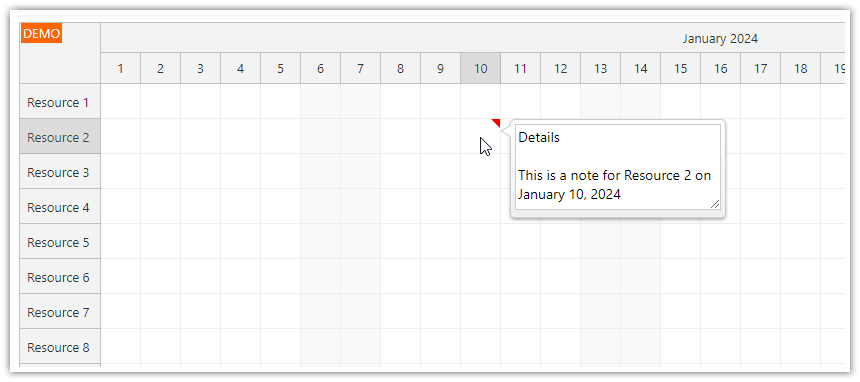
This tutorial shows how to customize the cell bubble content to include an editable text area with cell notes.
ASP.NET WebForms
<DayPilot:DayPilotScheduler runat="server" id="DayPilotScheduler1"
  ...
  CellBubbleID = "DayPilotBubble1"
/>

<DayPilot:DayPilotBubble ID="DayPilotBubble1" runat="server"
  CssOnly="true"
  CssClassPrefix="bubble_default"
/>
By default, the Bubble HTML content is determined by calling a server-side event:
RenderCellBubble
The HTML can be set by changing e.InnerHTML:
e.InnerHTML = "Event Details";
You can one Bubble control for several controls. The ID of the source control is stored in e.SourceUniqueID property:
e.SourceUniqueID
Availability
Availability of this feature in DayPilot editions:
| Lite | Pro | |
|---|---|---|
| DayPilot for JavaScript | ||
| DayPilot for ASP.NET WebForms | ||
| DayPilot for ASP.NET MVC | ||
| DayPilot for Java |