 DayPilot
Separators mark a date and time with a vertical line. Use them to show a deadline, a review date, or the current time on the Scheduler timeline. Define the lines in the separators array.
Appearance
Each separator has a location and can customize its appearance:
color: the line color.width: the line width in pixels.layer:"BelowEvents"(the default) or"AboveEvents".opacity: opacity as a percentage.
The API reference lists all supported properties, including CSS classes and tooltip text.
JavaScript
Global and Resource-Specific Separators
A separator without a resource draws a line across the grid. Add a resource ID to limit it to that resource's row. This is useful for room inspection times, machine deadlines, or other checkpoints that apply to just one resource.
Resource-specific separators are available in DayPilot Pro for JavaScript since version 2026.4.7101, with viewType set to "Resources" (the default).
This configuration marks 9 a.m. across both rooms and noon in Room A. The red line uses "AboveEvents" to remain visible over bookings:
The example assumes that the DayPilot library is loaded and a <div id="dp"></div> element is available.
const dp = new DayPilot.Scheduler("dp", {
  startDate: "2026-11-02",
  days: 1,
  scale: "Hour",
  timeHeaders: [{groupBy: "Day"}, {groupBy: "Hour"}],
  resources: [
    {id: "A", name: "Room A"},
    {id: "B", name: "Room B"}
  ],
  separators: [
    {location: "2026-11-02T09:00:00", color: "#888888"},
    {
      location: "2026-11-02T12:00:00",
      resource: "A",
      color: "#dc2626",
      width: 2,
      layer: "AboveEvents"
    }
  ]
});
dp.init();
The resource value must match an ID in resources, including its type. Omit it or use null for a global separator. If the resource is not loaded or no longer exists, its separator is not displayed.
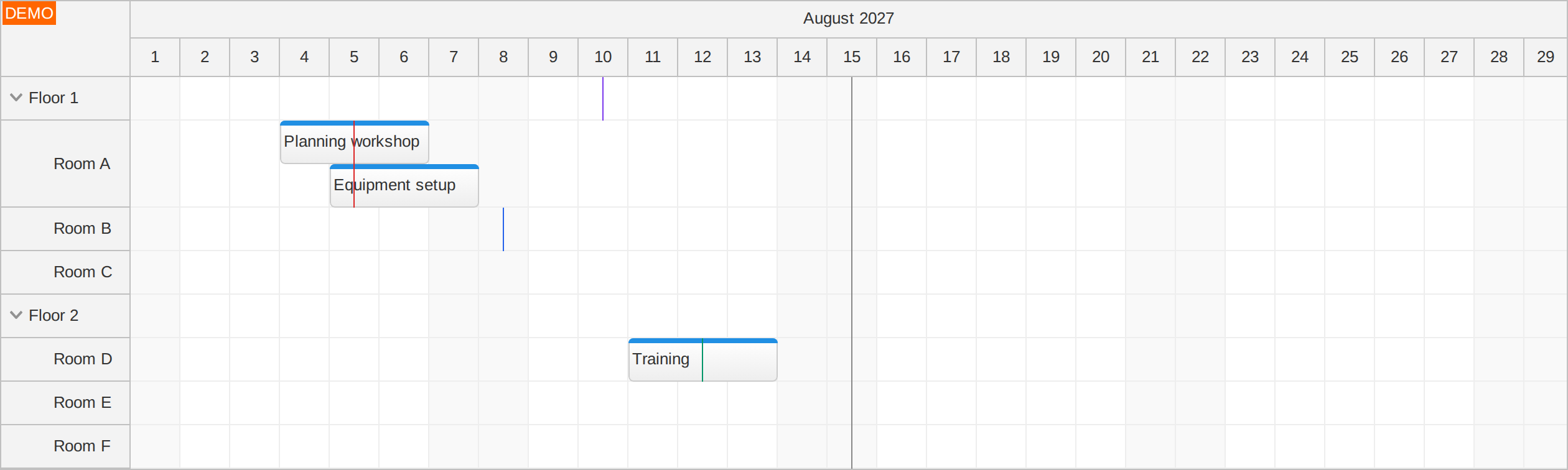
Try the separators demo to see the lines follow their rows when bookings change or a floor is collapsed.
Resource Trees and Row Height
In a resource tree, a separator assigned to a parent covers only the parent's own row. Add separators for the children to show their individual checkpoints. A child's line disappears while its row is collapsed, filtered out, or hidden, and returns when the row becomes visible.
Lines also follow changes in row height, such as when overlapping events require more space. For split resources, assign the separator to a split child ID because the split parent has no separate grid row.
Separators in Sticky Parent Rows
Since DayPilot Pro 2026.3.7055, separators also appear in sticky parent rows. A global separator remains aligned with the timeline as you scroll. A resource-specific separator appears only in the sticky row for its own parent resource.
Updating Separators
Pass a replacement array to update() when a checkpoint changes. Use an empty array to remove all separators:
dp.update({
  separators: [
    {location: "2026-11-02T09:00:00", color: "#888888"},
    {
      location: "2026-11-02T14:00:00",
      resource: "A",
      color: "#dc2626",
      width: 2,
      layer: "AboveEvents"
    }
  ]
});
To highlight the current time, set location to new DayPilot.Date() and refresh it at the interval required by your application. A separator keeps its configured date and time until you update it.
Angular
In Angular, define the timeline, rooms, and separators in a typed component configuration. The gray line marks 9 a.m. for both rooms; the red line marks noon only in Room A.
import {Component} from "@angular/core";
import {DayPilot, DayPilotModule} from "daypilot-pro-angular";

@Component({
  selector: "app-room-scheduler",
  standalone: true,
  imports: [DayPilotModule],
  template: '<daypilot-scheduler [config]="config"></daypilot-scheduler>'
})
export class RoomSchedulerComponent {
  config: DayPilot.SchedulerConfig = {
    startDate: "2026-11-02",
    days: 1,
    scale: "Hour",
    timeHeaders: [{groupBy: "Day"}, {groupBy: "Hour"}],
    resources: [
      {id: "A", name: "Room A"},
      {id: "B", name: "Room B"}
    ],
    separators: [
      {location: "2026-11-02T09:00:00", color: "#888888"},
      {
        location: "2026-11-02T12:00:00",
        resource: "A",
        color: "#dc2626",
        width: 2,
        layer: "AboveEvents"
      }
    ]
  };
}
React
In React, pass each setting directly to DayPilotScheduler. The separators prop includes one global line and one line assigned to Room A.
import {DayPilotScheduler} from "daypilot-pro-react";

export default function RoomScheduler() {
  return (
    <DayPilotScheduler
      startDate="2026-11-02"
      days={1}
      scale="Hour"
      timeHeaders={[{groupBy: "Day"}, {groupBy: "Hour"}]}
      resources={[
        {id: "A", name: "Room A"},
        {id: "B", name: "Room B"}
      ]}
      separators={[
        {location: "2026-11-02T09:00:00", color: "#888888"},
        {
          location: "2026-11-02T12:00:00",
          resource: "A",
          color: "#dc2626",
          width: 2,
          layer: "AboveEvents"
        }
      ]}
    />
  );
}
Vue
This Vue single-file component passes the timeline, resource list, and separators as individual props. The red Room A checkpoint uses "AboveEvents" so it remains visible over bookings.
<script setup>
import {DayPilotScheduler} from "daypilot-pro-vue";
</script>

<template>
  <DayPilotScheduler
    startDate="2026-11-02"
    :days="1"
    scale="Hour"
    :timeHeaders="[{groupBy: 'Day'}, {groupBy: 'Hour'}]"
    :resources="[
      {id: 'A', name: 'Room A'},
      {id: 'B', name: 'Room B'}
    ]"
    :separators="[
      {location: '2026-11-02T09:00:00', color: '#888888'},
      {
        location: '2026-11-02T12:00:00',
        resource: 'A',
        color: '#dc2626',
        width: 2,
        layer: 'AboveEvents'
      }
    ]"
  />
</template>
Tutorials
ASP.NET WebForms
ASPX
<DayPilot:DayPilotScheduler ID="DayPilotScheduler1" runat="server" ... >
  ...
  <Separators>
    <DayPilot:Separator Color="green" Location="02/01/2019 12:00:00" />
    <DayPilot:Separator Color="green" Location="02/03/2019 12:00:00" />
    <DayPilot:Separator Color="red" Location="02/02/2019 00:00:00" />
  </Separators>
</DayPilot:DayPilotScheduler>
Custom Separator

// Red separator with 50% opacity placed at the current day with width equal to CellWidth, shown above events
DayPilotScheduler1.Separators.Add(DateTime.Today, Color.Red, SeparatorLayer.AboveEvents, DayPilotScheduler1.CellWidth, 50);
Example above:
// Red separator with 50% opacity placed at the current day with width equal to CellWidth, shown above events
DayPilotScheduler1.Separators.Add(DateTime.Today, Color.Red, SeparatorLayer.AboveEvents, DayPilotScheduler1.CellWidth, 50);
ASP.NET MVC
protected override void OnInit(InitArgs ea)
{
  // ...
  Separators.Clear();
  Separators.Add(DateTime.Now, Color.Red);
}
Availability
Availability of this feature in DayPilot editions:
| Product | Lite | Pro |
|---|---|---|
| DayPilot for JavaScript | ||
| DayPilot for ASP.NET WebForms | ||
| DayPilot for ASP.NET MVC | ||
| DayPilot for Java |