 DayPilot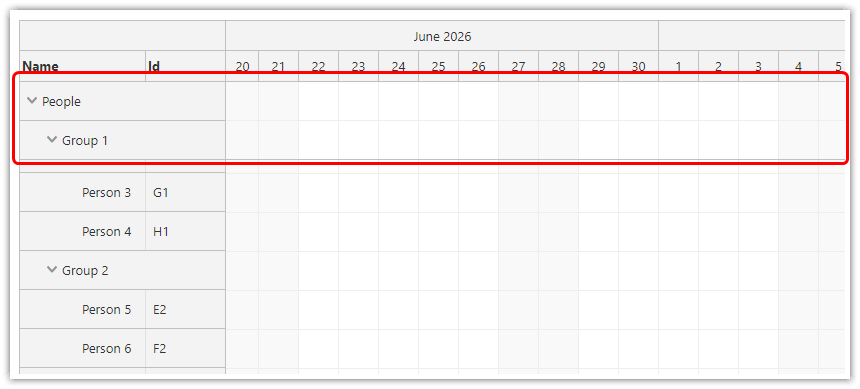
The parent rows displayed by the Scheduler component can be made sticky and stay visible during scrolling.
This feature is disabled by default. You can turn it on using the stickyParents property.
Multiple levels of resource tree are supported.
Available since 2026.2.6936.
See also the frozen rows feature.
Enable Sticky Parents
Enable the resource tree and sticky parents in the Scheduler configuration:
{
  treeEnabled: true,
  stickyParents: true
}
Available Vertical Space
The Scheduler keeps the parent rows of the currently visible resources at the top of the scrolling area. With several tree levels, the ancestor rows form a stack.
Since DayPilot Pro 2026.3.7055, the Scheduler automatically hides this sticky stack when the viewport is too short to show it and leave room for an ordinary row below it. It restores the stack when enough space becomes available. The original resource tree remains available by scrolling, and stickyParents stays enabled.
Separators
Separators also appear in sticky parent rows, keeping date markers aligned with the scrolling grid. This is supported since 2026.3.7055 and uses the existing separators configuration.
API: treeEnabled, stickyParents, heightSpec.
The examples place 40 child rooms under an expanded Rooms parent in a 300-pixel viewport. Scroll through the children to see the parent remain visible.
The framework examples use DayPilot Pro. For installation, see the Angular, React or Vue Scheduler guide.
Angular
import {Component} from "@angular/core";
import {DayPilot, DayPilotModule} from "daypilot-pro-angular";

@Component({
  selector: "app-scheduler-example",
  standalone: true,
  imports: [DayPilotModule],
  template: `

    <daypilot-scheduler [config]="config"></daypilot-scheduler>
  `
})
export class SchedulerExampleComponent {
  config: DayPilot.SchedulerConfig = {
    startDate: "2026-11-01",
    days: 30,
    scale: "Day",
    timeHeaders: [{groupBy: "Month"}, {groupBy: "Day", format: "d"}],
    resources: [{id: "group", name: "Rooms", expanded: true, children: Array.from({length: 40}, (_, i) => ({id: "R" + i, name: "Room " + (i + 1)}))}],
    events: [],
    treeEnabled: true,
    stickyParents: true,
    heightSpec: "Fixed",
    height: 300
  };

}
React
import React from "react";
import {DayPilot, DayPilotScheduler} from "daypilot-pro-react";

export default function SchedulerExample() {

  return <div>

    <DayPilotScheduler
      startDate={"2026-11-01"}
      days={30}
      scale={"Day"}
      timeHeaders={[{groupBy: "Month"}, {groupBy: "Day", format: "d"}]}
      resources={[{id: "group", name: "Rooms", expanded: true, children: Array.from({length: 40}, (_, i) => ({id: "R" + i, name: "Room " + (i + 1)}))}]}
      events={[]}
      treeEnabled={true}
      stickyParents={true}
      heightSpec={"Fixed"}
      height={300}
    />
  </div>;
}
Vue
<script setup>
import {DayPilot, DayPilotScheduler} from "daypilot-pro-vue";

const startDate = "2026-11-01";
const days = 30;
const scale = "Day";
const timeHeaders = [{groupBy: "Month"}, {groupBy: "Day", format: "d"}];
const resources = [{id: "group", name: "Rooms", expanded: true, children: Array.from({length: 40}, (_, i) => ({id: "R" + i, name: "Room " + (i + 1)}))}];
const events = [];
const treeEnabled = true;
const stickyParents = true;
const heightSpec = "Fixed";
const height = 300;

</script>

<template>
  <div>

    <DayPilotScheduler
      :startDate="startDate"
      :days="days"
      :scale="scale"
      :timeHeaders="timeHeaders"
      :resources="resources"
      :events="events"
      :treeEnabled="treeEnabled"
      :stickyParents="stickyParents"
      :heightSpec="heightSpec"
      :height="height"
    />
  </div>
</template>
Availability
Availability of this feature in DayPilot editions:
| Product | Lite | Pro |
|---|---|---|
| DayPilot for JavaScript | ||
| DayPilot for ASP.NET WebForms | ||
| DayPilot for ASP.NET MVC | ||
| DayPilot for Java |