 DayPilot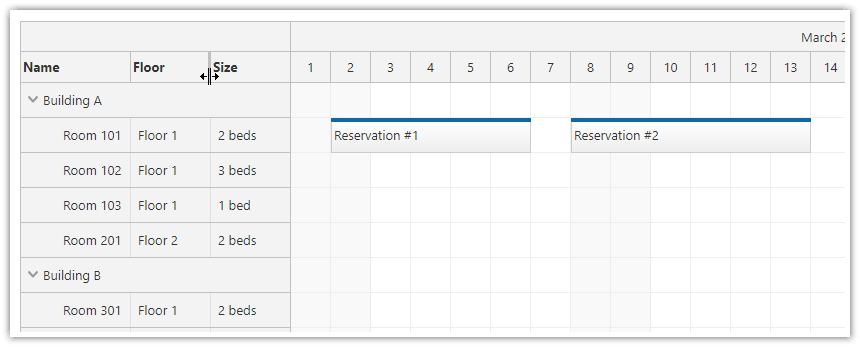
The JavaScript Scheduler component can display multiple columns in the row header.
By default, the columns can be resized using drag handles displayed between the column titles at the top.
You can disable the columns resizing option:
globally using the rowHeaderColumnsResizable property (set the value to
falseto disable resizing)per column, using the
nonresizableproperty of rowHeaderColumns array items
Scheduler config:
{
  // ...
  rowHeaderColumnsResizable: true,
  rowHeaderColumns: [
      {text: 'Name', display: "name", nonresizable: true},
      {text: 'Floor', display: "location"},
      {text: 'Size', display: "size"}
  ],
  // ...
}
When the user completes the resizing, the Scheduler fires the onRowHeaderColumnResized handler.
You can use this event handler to store the new widths. The rowHeaderColumns property will contain the updated widths.
Scheduler config:
{
  // ...
  onRowHeaderColumnResized: args => {
    console.log("rowHeaderColumns", scheduler.rowHeaderColumns);
  },
  // ...
}
API: rowHeaderColumns, rowHeaderColumnsResizable.
The framework examples start with a 160-pixel Room column and a 100-pixel Capacity column. Drag their title separators to adjust the widths.
The framework examples use DayPilot Pro. For installation, see the Angular, React or Vue Scheduler guide.
Angular
import {Component} from "@angular/core";
import {DayPilot, DayPilotModule} from "daypilot-pro-angular";

@Component({
  selector: "app-scheduler-example",
  standalone: true,
  imports: [DayPilotModule],
  template: `

    <daypilot-scheduler [config]="config"></daypilot-scheduler>
  `
})
export class SchedulerExampleComponent {
  config: DayPilot.SchedulerConfig = {
    startDate: "2026-11-01",
    days: 30,
    scale: "Day",
    timeHeaders: [{groupBy: "Month"}, {groupBy: "Day", format: "d"}],
    resources: [{id: "A", name: "Room A", capacity: 4}, {id: "B", name: "Room B", capacity: 8}],
    events: [{id: 1, text: "Planning", resource: "A", start: "2026-11-03", end: "2026-11-06"}, {id: 2, text: "Delivery", resource: "B", start: "2026-11-08", end: "2026-11-11"}],
    rowHeaderColumns: [{text: "Room", display: "name", width: 160}, {text: "Capacity", display: "capacity", width: 100}],
    rowHeaderColumnsResizable: true
  };

}
React
import React from "react";
import {DayPilot, DayPilotScheduler} from "daypilot-pro-react";

export default function SchedulerExample() {

  return <div>

    <DayPilotScheduler
      startDate={"2026-11-01"}
      days={30}
      scale={"Day"}
      timeHeaders={[{groupBy: "Month"}, {groupBy: "Day", format: "d"}]}
      resources={[{id: "A", name: "Room A", capacity: 4}, {id: "B", name: "Room B", capacity: 8}]}
      events={[{id: 1, text: "Planning", resource: "A", start: "2026-11-03", end: "2026-11-06"}, {id: 2, text: "Delivery", resource: "B", start: "2026-11-08", end: "2026-11-11"}]}
      rowHeaderColumns={[{text: "Room", display: "name", width: 160}, {text: "Capacity", display: "capacity", width: 100}]}
      rowHeaderColumnsResizable={true}
    />
  </div>;
}
Vue
<script setup>
import {DayPilot, DayPilotScheduler} from "daypilot-pro-vue";

const startDate = "2026-11-01";
const days = 30;
const scale = "Day";
const timeHeaders = [{groupBy: "Month"}, {groupBy: "Day", format: "d"}];
const resources = [{id: "A", name: "Room A", capacity: 4}, {id: "B", name: "Room B", capacity: 8}];
const events = [{id: 1, text: "Planning", resource: "A", start: "2026-11-03", end: "2026-11-06"}, {id: 2, text: "Delivery", resource: "B", start: "2026-11-08", end: "2026-11-11"}];
const rowHeaderColumns = [{text: "Room", display: "name", width: 160}, {text: "Capacity", display: "capacity", width: 100}];
const rowHeaderColumnsResizable = true;

</script>

<template>
  <div>

    <DayPilotScheduler
      :startDate="startDate"
      :days="days"
      :scale="scale"
      :timeHeaders="timeHeaders"
      :resources="resources"
      :events="events"
      :rowHeaderColumns="rowHeaderColumns"
      :rowHeaderColumnsResizable="rowHeaderColumnsResizable"
    />
  </div>
</template>
Availability
Availability of this feature in DayPilot editions:
| Product | Lite | Pro |
|---|---|---|
| DayPilot for JavaScript | ||
| DayPilot for ASP.NET WebForms | ||
| DayPilot for ASP.NET MVC | ||
| DayPilot for Java |