 DayPilot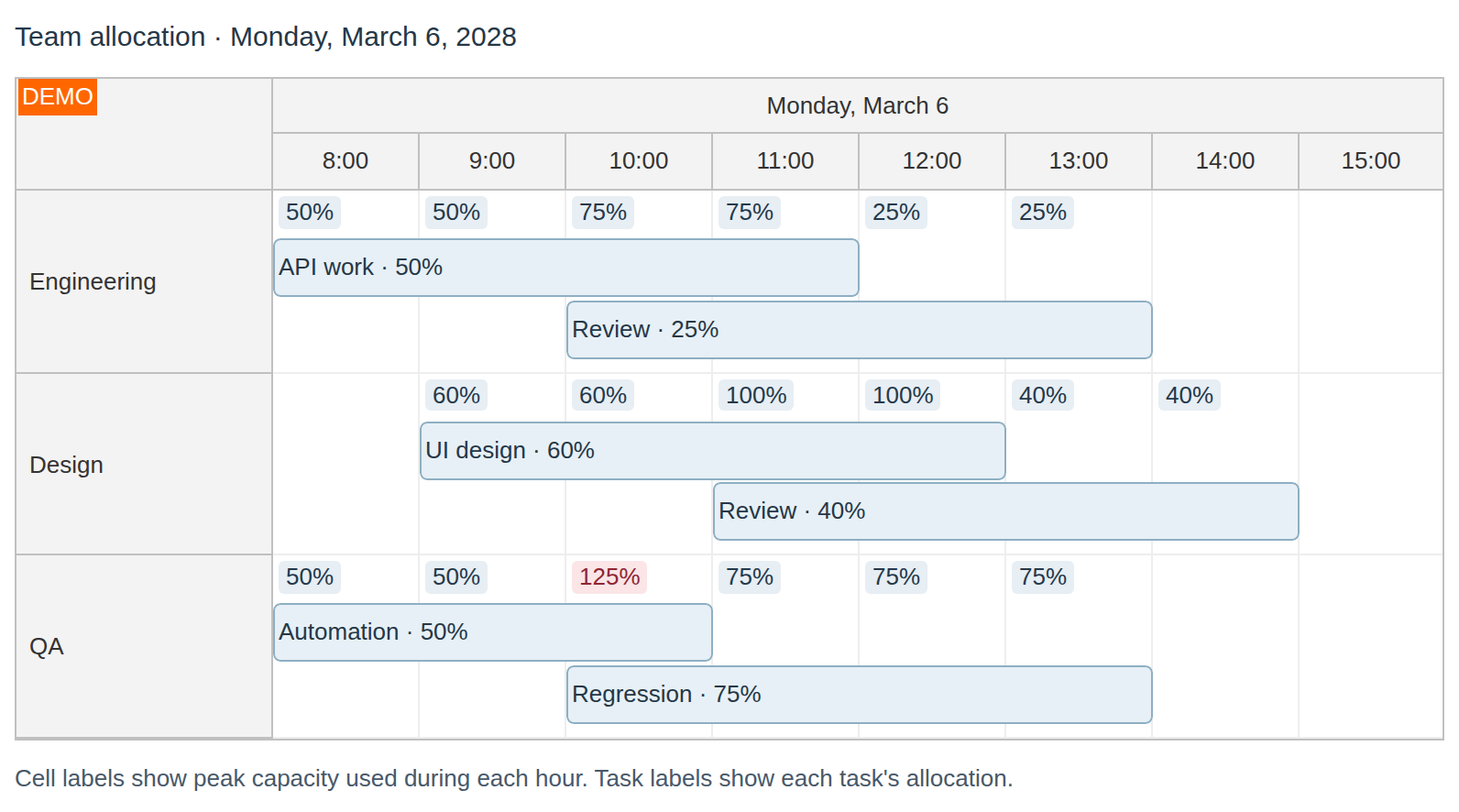
You can specify resource consumption for each event and calculate the total utilization for each cell.
JavaScript Scheduler
How to Show Utilization Percentage
You can specify the capacity used by an event as a percentage of the total:
var e = new DayPilot.Event({
  start: "2021-03-25T00:00:00",
  end: "2021-03-26T12:00:00",
  id: "1002",
  resource: "A",
  percentage: 10,
  text: "Utilization: 10%"
});

dp.events.add(e);
Calculate resource utilization for cells:
dp.rowMarginTop = 26;
dp.beforeCellRenderCaching = false;
dp.onBeforeCellRender = function(args) {
  var utilization = args.cell.utilization("percentage");
  if (utilization > 0) {
    var background = utilization > 100 ? "#fbe5e7" : "#e7eef4";
    var color = utilization > 100 ? "#8f2632" : "#24394b";
    args.cell.html = "<div style='position: absolute; left: 3px; top: 3px; padding: 1px 4px; border-radius: 3px; background-color: " + background + "; color: " + color + ";'>" + utilization + "%</div>";
  }
  else {
    args.cell.html = "";
  }
};
Demo
How to Show Utilization using Custom Units
You can use custom units for the utilization field. This example assumes the capacity of each resources is 10 units. The capacity used by each event is specified in custom units instead of percentage:
dp.events.list = [{id: 1, text: "Reservation", resource: "A", start: "2026-11-03", end: "2026-11-06", utilization: 1}];
dp.beforeCellRenderCaching = false;
dp.onBeforeCellRender = function(args) {
  var capacity = 10;
  var utilization = args.cell.utilization("utilization");
  var percentage = capacity > 0 ? 100 * utilization / capacity : 0;
  // ...
};
You can also specify the capacity for each resource using a custom field in "resources" array:
dp.resources = [{id: "A", name: "Room A", capacity: 6, cellsAutoUpdated: true}];
dp.events.list = [{id: 1, text: "Reservation", resource: "A", start: "2026-11-03", end: "2026-11-06", utilization: 1}];
dp.beforeCellRenderCaching = false;
dp.onBeforeCellRender = function(args) {
  var capacity = dp.rows.find(args.cell.resource).data.capacity;
  var utilization = args.cell.utilization("utilization");
  var percentage = capacity > 0 ? 100 * utilization / capacity : 0;
  // ...
};
JavaScript Tutorials
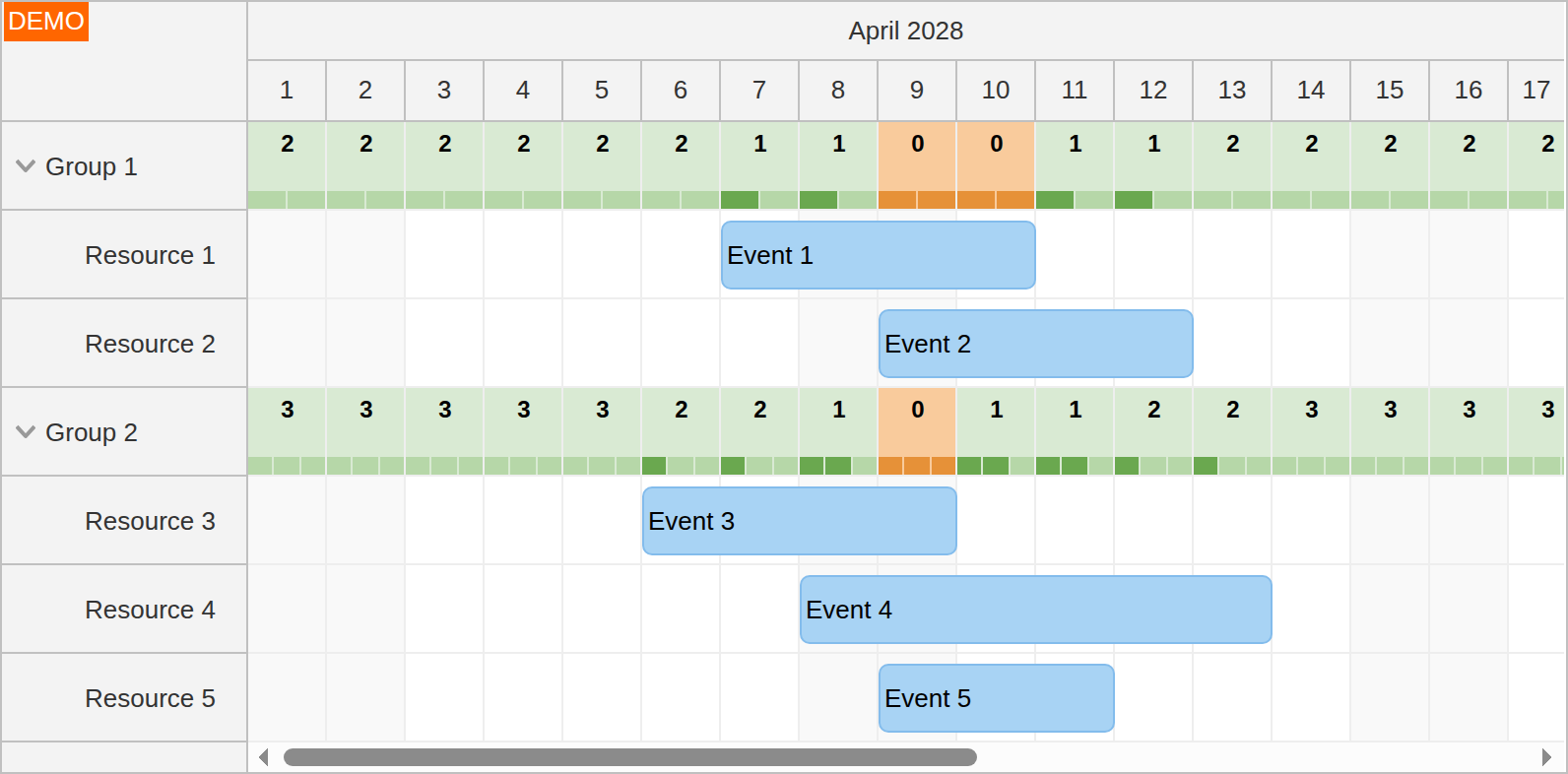
The JavaScript Scheduler: Displaying Group Availability tutorial displays utilization of child resources in the parent rows.
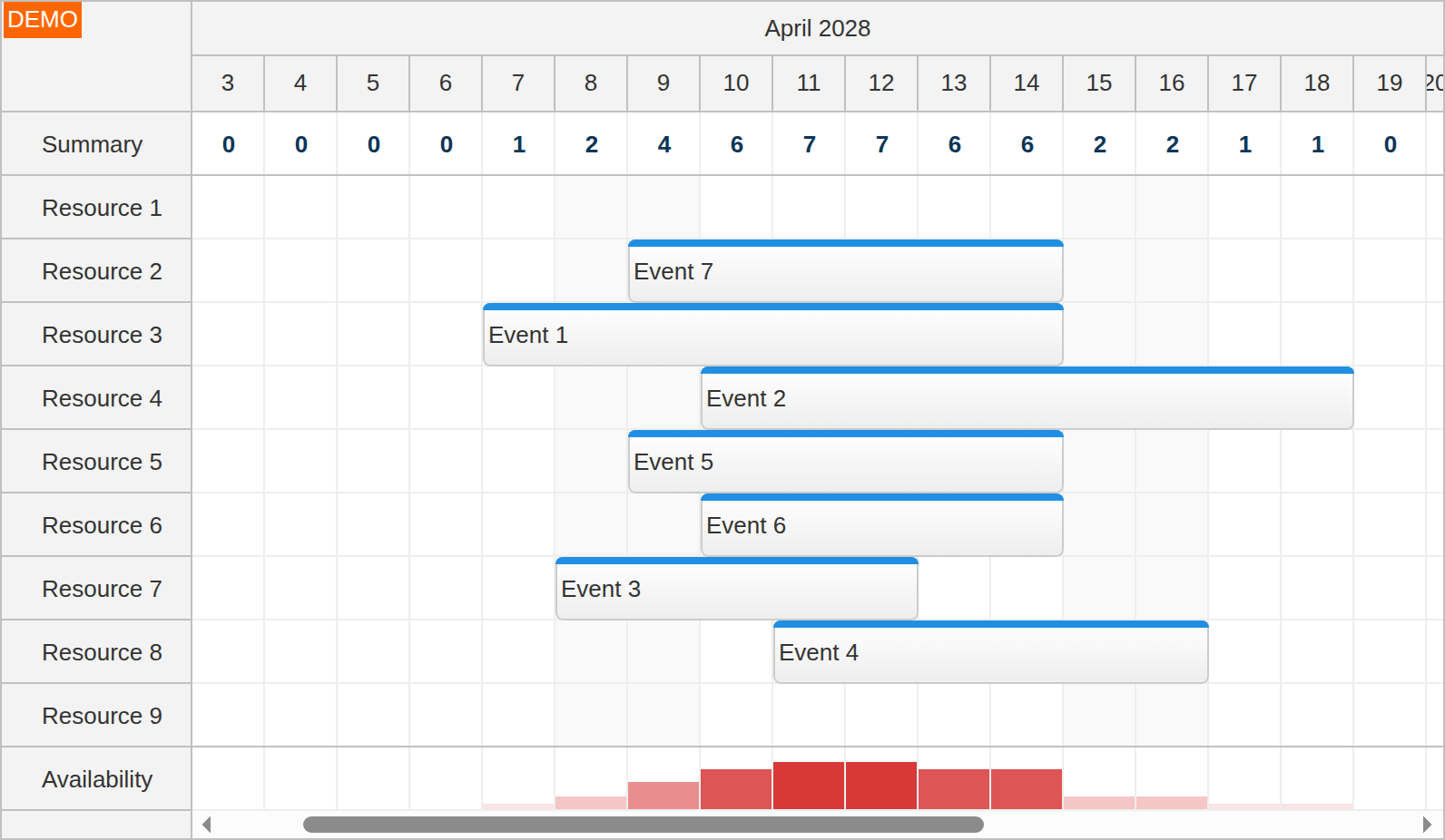
The JavaScript Scheduler: Column Summary and Availability Chart tutorials displays a summary of time slot utilization in a special fixed row at the top of the JavaScript Scheduler and a histogram in a fixed row at the bottom.
API: beforeCellRenderCaching, onBeforeCellRender.
The examples divide the peak overlapping reservation units by each room's capacity and shade the cell by the resulting percentage. This is not a duration-weighted average. Resources use cellsAutoUpdated and the config disables beforeCellRenderCaching so event changes can refresh the calculated cell display.
The framework examples use DayPilot Pro. For installation, see the Angular, React or Vue Scheduler guide.
Angular
import {Component} from "@angular/core";
import {DayPilot, DayPilotModule} from "daypilot-pro-angular";

@Component({
  selector: "app-scheduler-example",
  standalone: true,
  imports: [DayPilotModule],
  template: `

    <daypilot-scheduler [config]="config"></daypilot-scheduler>
  `
})
export class SchedulerExampleComponent {
  config: DayPilot.SchedulerConfig = {
    startDate: "2026-11-01",
    days: 30,
    scale: "Day",
    timeHeaders: [{groupBy: "Month"}, {groupBy: "Day", format: "d"}],
    resources: [{id: "A", name: "Room A", capacity: 4, cellsAutoUpdated: true}, {id: "B", name: "Room B", capacity: 8, cellsAutoUpdated: true}],
    events: [{id: 1, text: "Two seats", resource: "A", start: "2026-11-03", end: "2026-11-06", units: 2}, {id: 2, text: "One seat", resource: "A", start: "2026-11-04", end: "2026-11-05", units: 1}],
    beforeCellRenderCaching: false,
    onBeforeCellRender: args => {
        const capacity = args.cell.row.data.capacity;
        const used = args.cell.utilization("units");
        if (capacity > 0 && used > 0) {
          const percentage = Math.round(100 * used / capacity);
          args.cell.properties.text = percentage + "%";
          args.cell.properties.backColor = percentage > 100 ? "#fecaca" : "#dbeafe";
        }
      }
  };

}
Angular Tutorials
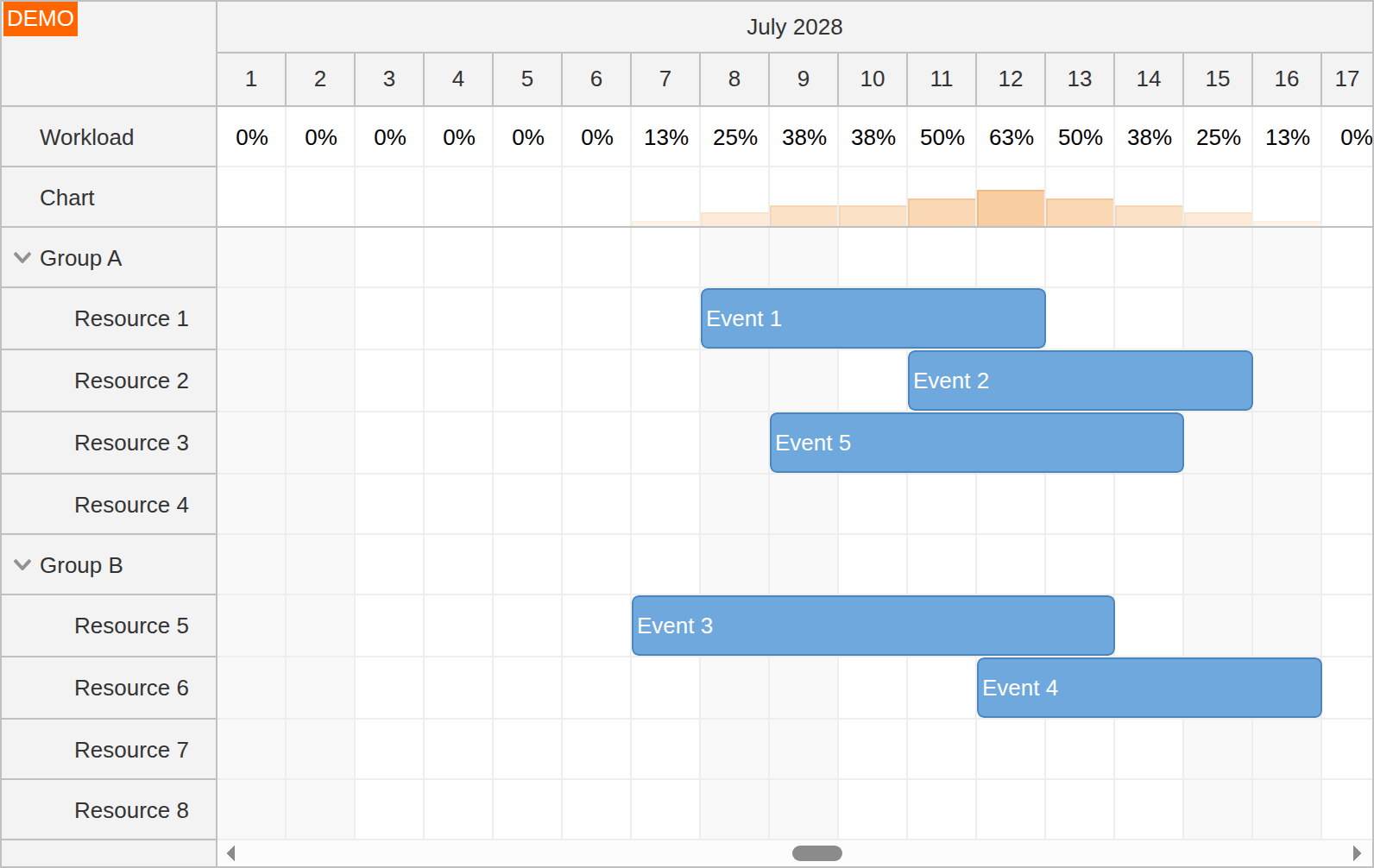
The Angular Scheduler: Resource Utilization Chart tutorial shows how to display utilization percentage and a histogram in special rows fixed at the top of the Angular Scheduler component.
React
import React from "react";
import {DayPilot, DayPilotScheduler} from "daypilot-pro-react";

export default function SchedulerExample() {

  return <div>

    <DayPilotScheduler
      startDate={"2026-11-01"}
      days={30}
      scale={"Day"}
      timeHeaders={[{groupBy: "Month"}, {groupBy: "Day", format: "d"}]}
      resources={[{id: "A", name: "Room A", capacity: 4, cellsAutoUpdated: true}, {id: "B", name: "Room B", capacity: 8, cellsAutoUpdated: true}]}
      events={[{id: 1, text: "Two seats", resource: "A", start: "2026-11-03", end: "2026-11-06", units: 2}, {id: 2, text: "One seat", resource: "A", start: "2026-11-04", end: "2026-11-05", units: 1}]}
      beforeCellRenderCaching={false}
      onBeforeCellRender={args => {
          const capacity = args.cell.row.data.capacity;
          const used = args.cell.utilization("units");
          if (capacity > 0 && used > 0) {
            const percentage = Math.round(100 * used / capacity);
            args.cell.properties.text = percentage + "%";
            args.cell.properties.backColor = percentage > 100 ? "#fecaca" : "#dbeafe";
          }
        }}
    />
  </div>;
}
Vue
<script setup>
import {DayPilot, DayPilotScheduler} from "daypilot-pro-vue";

const startDate = "2026-11-01";
const days = 30;
const scale = "Day";
const timeHeaders = [{groupBy: "Month"}, {groupBy: "Day", format: "d"}];
const resources = [{id: "A", name: "Room A", capacity: 4, cellsAutoUpdated: true}, {id: "B", name: "Room B", capacity: 8, cellsAutoUpdated: true}];
const events = [{id: 1, text: "Two seats", resource: "A", start: "2026-11-03", end: "2026-11-06", units: 2}, {id: 2, text: "One seat", resource: "A", start: "2026-11-04", end: "2026-11-05", units: 1}];
const beforeCellRenderCaching = false;
const onBeforeCellRender = args => {
    const capacity = args.cell.row.data.capacity;
    const used = args.cell.utilization("units");
    if (capacity > 0 && used > 0) {
      const percentage = Math.round(100 * used / capacity);
      args.cell.properties.text = percentage + "%";
      args.cell.properties.backColor = percentage > 100 ? "#fecaca" : "#dbeafe";
    }
  };

</script>

<template>
  <div>

    <DayPilotScheduler
      :startDate="startDate"
      :days="days"
      :scale="scale"
      :timeHeaders="timeHeaders"
      :resources="resources"
      :events="events"
      :beforeCellRenderCaching="beforeCellRenderCaching"
      :onBeforeCellRender="onBeforeCellRender"
    />
  </div>
</template>
Availability
Availability of this feature in DayPilot editions:
| Product | Lite | Pro |
|---|---|---|
| DayPilot for JavaScript | ||
| DayPilot for ASP.NET WebForms | ||
| DayPilot for ASP.NET MVC | ||
| DayPilot for Java |