 DayPilot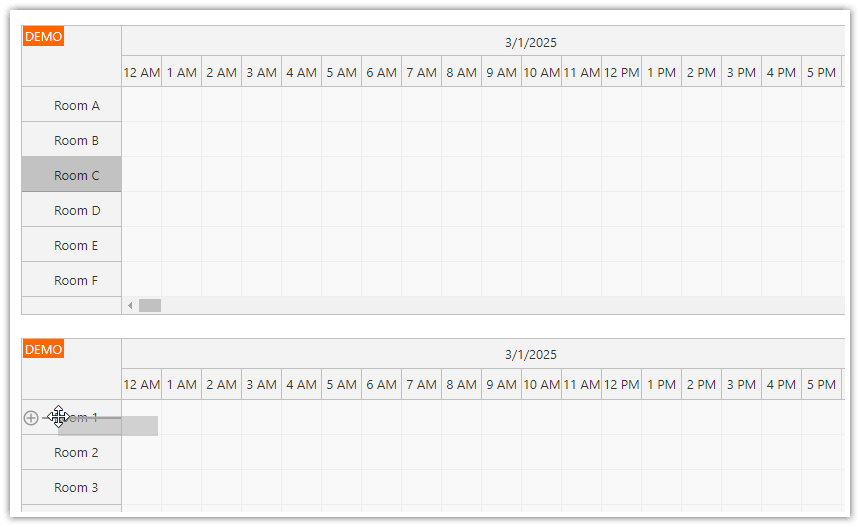
It is possible to use drag and drop to move rows (representing resources) between two JavaScript Scheduler instances.
Enable rowMoveHandling on the source Scheduler. A target Scheduler accepts incoming rows unless its onRowMoving or onRowMove callback rejects the operation.
By default, the dragged row is removed from the source Scheduler. To keep it, call args.keepSource() in the target Scheduler onRowMove event handler.
Available since version 2024.4.6270.
Example
Detecting a row from another Scheduler
You can detect the source Scheduler by checking the args.source.calendar property in onRowMoving, onRowMove, and onRowMoved event handlers. This property stores a DayPilot.Scheduler object representing the source Scheduler.
Scheduler config:
{
  onRowMove: args => {
    if (args.external) {
      console.log("External row drag and drop detected. Source Scheduler: " + args.source.calendar.id);
    }
  },

}
Demo
API: heightSpec, height, rowMoveHandling.
Drag Room A from the first Scheduler onto Room B in the second. The row moves between the two resource lists using the configured Update handling.
The framework examples use DayPilot Pro. For installation, see the Angular, React or Vue Scheduler guide.
Angular
Bind the Scheduler instances to separate config and secondConfig objects so each starts with its own resource collection.
import {Component} from "@angular/core";
import {DayPilot, DayPilotModule} from "daypilot-pro-angular";

@Component({
  selector: "app-scheduler-example",
  standalone: true,
  imports: [DayPilotModule],
  template: `

    <daypilot-scheduler [config]="config"></daypilot-scheduler>
    <daypilot-scheduler [config]="secondConfig"></daypilot-scheduler>
  `
})
export class SchedulerExampleComponent {
  config: DayPilot.SchedulerConfig = {
    startDate: "2026-11-01",
    days: 30,
    scale: "Day",
    timeHeaders: [{groupBy: "Month"}, {groupBy: "Day", format: "d"}],
    resources: [{id: "A", name: "Room A"}],
    events: [],
    heightSpec: "Fixed",
    height: 180,
    rowMoveHandling: "Update",
    rowDragHandleVisibility: "Visible"
  };
  secondConfig: DayPilot.SchedulerConfig = {
    startDate: "2026-11-01",
    days: 30,
    scale: "Day",
    timeHeaders: [{groupBy: "Month"}, {groupBy: "Day", format: "d"}],
    resources: [{id: "B", name: "Room B"}],
    events: [],
    heightSpec: "Fixed",
    height: 180,
    rowMoveHandling: "Update",
    rowDragHandleVisibility: "Visible"
  };

}
React
Render two DayPilotScheduler instances and pass their respective resource arrays as individual props.
import React from "react";
import {DayPilot, DayPilotScheduler} from "daypilot-pro-react";

export default function SchedulerExample() {

  return <div>

    <DayPilotScheduler
      startDate={"2026-11-01"}
      days={30}
      scale={"Day"}
      timeHeaders={[{groupBy: "Month"}, {groupBy: "Day", format: "d"}]}
      resources={[{id: "A", name: "Room A"}]}
      events={[]}
      heightSpec={"Fixed"}
      height={180}
      rowMoveHandling={"Update"}
      rowDragHandleVisibility={"Visible"}
    />
    <DayPilotScheduler
      startDate={"2026-11-01"}
      days={30}
      scale={"Day"}
      timeHeaders={[{groupBy: "Month"}, {groupBy: "Day", format: "d"}]}
      resources={[{id: "B", name: "Room B"}]}
      events={[]}
      heightSpec={"Fixed"}
      height={180}
      rowMoveHandling={"Update"}
      rowDragHandleVisibility={"Visible"}
    />
  </div>;
}
Vue
Use resources for the first Scheduler and secondResources for the second; the template shares the timeline settings between them.
<script setup>
import {DayPilot, DayPilotScheduler} from "daypilot-pro-vue";

const startDate = "2026-11-01";
const days = 30;
const scale = "Day";
const timeHeaders = [{groupBy: "Month"}, {groupBy: "Day", format: "d"}];
const resources = [{id: "A", name: "Room A"}];
const events = [];
const heightSpec = "Fixed";
const height = 180;
const rowMoveHandling = "Update";
const rowDragHandleVisibility = "Visible";
const secondResources = [{id: "B", name: "Room B"}];
const secondEvents = [];

</script>

<template>
  <div>

    <DayPilotScheduler
      :startDate="startDate"
      :days="days"
      :scale="scale"
      :timeHeaders="timeHeaders"
      :resources="resources"
      :events="events"
      :heightSpec="heightSpec"
      :height="height"
      :rowMoveHandling="rowMoveHandling"
      :rowDragHandleVisibility="rowDragHandleVisibility"
    />
    <DayPilotScheduler
      :startDate="startDate"
      :days="days"
      :scale="scale"
      :timeHeaders="timeHeaders"
      :resources="secondResources"
      :events="secondEvents"
      :heightSpec="heightSpec"
      :height="height"
      :rowMoveHandling="rowMoveHandling"
      :rowDragHandleVisibility="rowDragHandleVisibility"
    />
  </div>
</template>
Availability
Availability of this feature in DayPilot editions:
| Product | Lite | Pro |
|---|---|---|
| DayPilot for JavaScript | ||
| DayPilot for ASP.NET WebForms | ||
| DayPilot for ASP.NET MVC | ||
| DayPilot for Java |