 DayPilot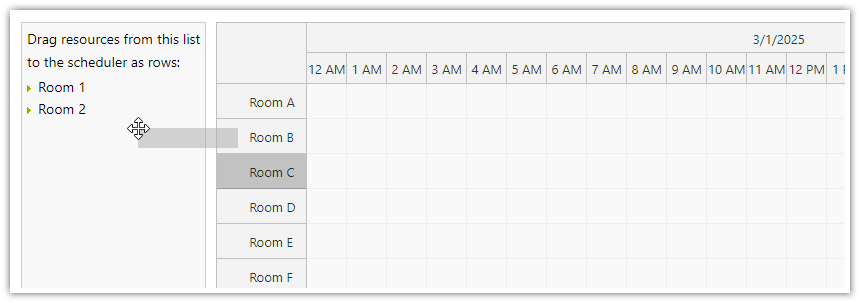
The Scheduler supports drag-and-drop moving of rows (resources) to and from an external list.
Available since version 2024.4.6270.
Making External Items Draggable to Scheduler as Rows
Use the DayPilot.Scheduler.makeDraggableAsRow() method to make an element draggable:
const item = {
    element: document.querySelector("#item"),
    data: {
        id: 1,
        name: "Item 1",
    }
};
DayPilot.Scheduler.makeDraggableAsRow(item);
The element property defines the source element that will be activated.
By default, this element will be removed from the DOM when it is dropped as a row in the Scheduler.
The data property specifies the resource data object that will be used to create the new row on drop.
Dropping an external item requires an existing resource row as its target. An empty Scheduler, or one containing only the new-row placeholder, cancels the drop and leaves the external item in its original list.
Activating an Element as Drop Target
Use the DayPilot.Scheduler.registerRowDropTarget() method to activate an element as a drop target for rows dragged out of the Scheduler:
DayPilot.Scheduler.registerRowDropTarget({
    element: document.getElementById("queue"),
    onDrop: args => {
        const parent = document.getElementById("list");
        const li = document.createElement("li");
        li.setAttribute("data-id", args.row.id);
        li.innerText = args.row.name;
        parent.appendChild(li);

        dp.rows.remove(args.row);
        document.getElementById("queue").style.backgroundColor = "";
    },
    onDragOver: args => {
        document.getElementById("queue").style.backgroundColor = "#f8f8f8";
    },
    onDragLeave: args => {
        document.getElementById("queue").style.backgroundColor = "";
    }
});
The element property defines the target element.
The onDrop event handler can be used to create a new list item in the target element.
You can use the onDragOver and onDragLeave events to implement hover effects.
Demo
API: rowMoveHandling, rowDragHandleVisibility.
Drag New room onto an existing resource row. The target Scheduler must contain a real row; an empty schedule cannot accept this drop. Application code creates the draggable child inside a framework-owned source container so that child can be removed after a successful drop.
The framework examples use DayPilot Pro. For installation, see the Angular, React or Vue Scheduler guide.
Angular
Access the source container using @ViewChild and call makeDraggableAsRow() in ngAfterViewInit(). Stop dragging and clear the container in ngOnDestroy().
import {Component, ViewChild, ElementRef, AfterViewInit, OnDestroy} from "@angular/core";
import {DayPilot, DayPilotModule} from "daypilot-pro-angular";

@Component({
  selector: "app-scheduler-example",
  standalone: true,
  imports: [DayPilotModule],
  template: `
    <div #sourceHost></div>
    <daypilot-scheduler [config]="config"></daypilot-scheduler>
  `
})
export class SchedulerExampleComponent implements AfterViewInit, OnDestroy {
  @ViewChild("sourceHost") sourceHost!: ElementRef<HTMLDivElement>;
  config: DayPilot.SchedulerConfig = {
    startDate: "2026-11-01",
    days: 30,
    scale: "Day",
    timeHeaders: [{groupBy: "Month"}, {groupBy: "Day", format: "d"}],
    resources: [{id: "A", name: "Room A"}, {id: "B", name: "Room B"}],
    events: [{id: 1, text: "Planning", resource: "A", start: "2026-11-03", end: "2026-11-06"}, {id: 2, text: "Delivery", resource: "B", start: "2026-11-08", end: "2026-11-11"}],
    rowMoveHandling: "Update",
    rowDragHandleVisibility: "Visible"
  };

  ngAfterViewInit() {
    const item = document.createElement("div");
    item.textContent = "New room";
    item.style.cssText = "padding: 10px; margin: 8px 0; border: 1px solid #888; cursor: move;";
    this.sourceHost.nativeElement.appendChild(item);
    DayPilot.Scheduler.makeDraggableAsRow({element: item, data: {id: "new-room", name: "New room"}});
  }
  ngOnDestroy() { DayPilot.Scheduler.stopDragging(); this.sourceHost.nativeElement.replaceChildren(); }
}
React
Create and activate the draggable child inside useEffect, using the source container ref. The cleanup stops dragging and removes any remaining child.
import React, {useRef, useEffect} from "react";
import {DayPilot, DayPilotScheduler} from "daypilot-pro-react";

export default function SchedulerExample() {
  const sourceHost = useRef(null);
  useEffect(() => {
    const item = document.createElement("div");
    item.textContent = "New room";
    item.style.cssText = "padding: 10px; margin: 8px 0; border: 1px solid #888; cursor: move;";
    sourceHost.current.appendChild(item);
    DayPilot.Scheduler.makeDraggableAsRow({element: item, data: {id: "new-room", name: "New room"}});
    return () => { DayPilot.Scheduler.stopDragging(); item.remove(); };
  }, []);

  return <div>
    <div ref={sourceHost} />

    <DayPilotScheduler
      startDate={"2026-11-01"}
      days={30}
      scale={"Day"}
      timeHeaders={[{groupBy: "Month"}, {groupBy: "Day", format: "d"}]}
      resources={[{id: "A", name: "Room A"}, {id: "B", name: "Room B"}]}
      events={[{id: 1, text: "Planning", resource: "A", start: "2026-11-03", end: "2026-11-06"}, {id: 2, text: "Delivery", resource: "B", start: "2026-11-08", end: "2026-11-11"}]}
      rowMoveHandling={"Update"}
      rowDragHandleVisibility={"Visible"}
    />
  </div>;
}
Vue
Create the child in onMounted() after the source template ref is available. onUnmounted() stops dragging and removes the child if it remains.
<script setup>
import {ref, onMounted, onUnmounted} from "vue";
import {DayPilot, DayPilotScheduler} from "daypilot-pro-vue";

const sourceHost = ref(null);
const startDate = "2026-11-01";
const days = 30;
const scale = "Day";
const timeHeaders = [{groupBy: "Month"}, {groupBy: "Day", format: "d"}];
const resources = [{id: "A", name: "Room A"}, {id: "B", name: "Room B"}];
const events = [{id: 1, text: "Planning", resource: "A", start: "2026-11-03", end: "2026-11-06"}, {id: 2, text: "Delivery", resource: "B", start: "2026-11-08", end: "2026-11-11"}];
const rowMoveHandling = "Update";
const rowDragHandleVisibility = "Visible";

let item;
onMounted(() => {
  item = document.createElement("div");
    item.textContent = "New room";
    item.style.cssText = "padding: 10px; margin: 8px 0; border: 1px solid #888; cursor: move;";
    sourceHost.value.appendChild(item);
    DayPilot.Scheduler.makeDraggableAsRow({element: item, data: {id: "new-room", name: "New room"}});
});
onUnmounted(() => { DayPilot.Scheduler.stopDragging(); item?.remove(); });
</script>

<template>
  <div>
    <div ref="sourceHost"></div>

    <DayPilotScheduler
      :startDate="startDate"
      :days="days"
      :scale="scale"
      :timeHeaders="timeHeaders"
      :resources="resources"
      :events="events"
      :rowMoveHandling="rowMoveHandling"
      :rowDragHandleVisibility="rowDragHandleVisibility"
    />
  </div>
</template>
Availability
Availability of this feature in DayPilot editions:
| Product | Lite | Pro |
|---|---|---|
| DayPilot for JavaScript | ||
| DayPilot for ASP.NET WebForms | ||
| DayPilot for ASP.NET MVC | ||
| DayPilot for Java |