 DayPilot
The JavaScript Scheduler component supports split resources: A resource can be split into subresources which are displayed inline. This is different from the tree hierarchy where each parent is displayed as a special row.
Notes:
Split resources can be combined with the resource tree. The leaf nodes of the tree hierarchy can have subresources.
It works best with row header columns defined. You can specify the data source for each column (use
split: trueto use split resource data).When no row headers are defined, the Scheduler grid will display the subresources but the row header will only show the main row.
You can show the subresource data in multiple row header columns.
Row moving is supported for the main row.
Crosshair is supported, it will highlight the main row and the current subresource in the header.
Limitations:
Only one level is allowed (subresources can't be split).
If a resource has children, the subresources are ignored.
Available since version 2022.2.5302.
JavaScript Scheduler
Example
dp.rowHeaderColumns = [
    {name: "Location", display: "name"},
    {name: "Section", display: "name", split: true},
    {name: "Capacity", display: "capacity", split: true},
];

dp.resources = [
    {name: "Country 1", id: "C1", expanded: true, children: [
            {name: "Location 1", id: "L1", split: [
                    {name: "Section A", id: "L1.A", capacity: 40},
                    {name: "Section B", id: "L1.B", capacity: 40},
                    {name: "Section C", id: "L1.C", capacity: 30},
                ]},
            {name: "Location 2", id: "L2", split: [
                    {name: "Section A", id: "L2.A", capacity: 10},
                    {name: "Section B", id: "L2.B", capacity: 10},
                    {name: "Section C", id: "L2.C", capacity: 15},
                ]},
            {name: "Location 3", id: "L3", split: [
                    {name: "Section A", id: "L3.A", capacity: 10},
                    {name: "Section B", id: "L3.B", capacity: 20},
                    {name: "Section C", id: "L3.C", capacity: 30},
            ]},
        ]
    },
    {name: "Country 2", id: "C2", expanded: true, children: [
            {name: "Location 4", id: "L4", split: [
                    {name: "Section A", id: "L4.A", capacity: 40},
                    {name: "Section B", id: "L4.B", capacity: 40},
                    {name: "Section C", id: "L4.C", capacity: 30},
                ]},
            {name: "Location 5", id: "L2", split: [
                    {name: "Section A", id: "L5.A", capacity: 10},
                    {name: "Section B", id: "L5.B", capacity: 10},
                    {name: "Section C", id: "L5.C", capacity: 15},
                ]},
            {name: "Location 6", id: "L3", split: [
                    {name: "Section A", id: "L6.A", capacity: 10},
                    {name: "Section B", id: "L6.B", capacity: 20},
                    {name: "Section C", id: "L6.C", capacity: 30},
            ]},
        ]
    },
];
Demo
Tutorials
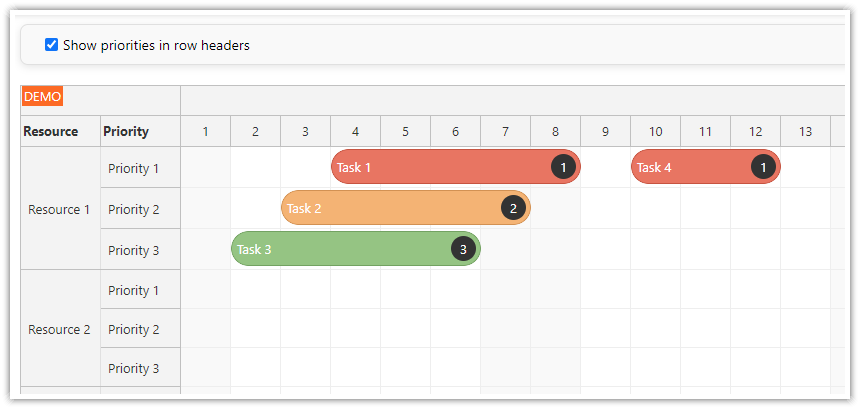
The JavaScript Scheduler: Using Split Resources to Manage Task Priorities tutorial shows how to configure the Scheduler to display a dedicated sub-row for each priority level. This allows you to group tasks with the same priority and display them at the same position within a row.
Availability
Availability of this feature in DayPilot editions:
| Lite | Pro | |
|---|---|---|
| DayPilot for JavaScript | ||
| DayPilot for ASP.NET WebForms | ||
| DayPilot for ASP.NET MVC | ||
| DayPilot for Java |