 DayPilot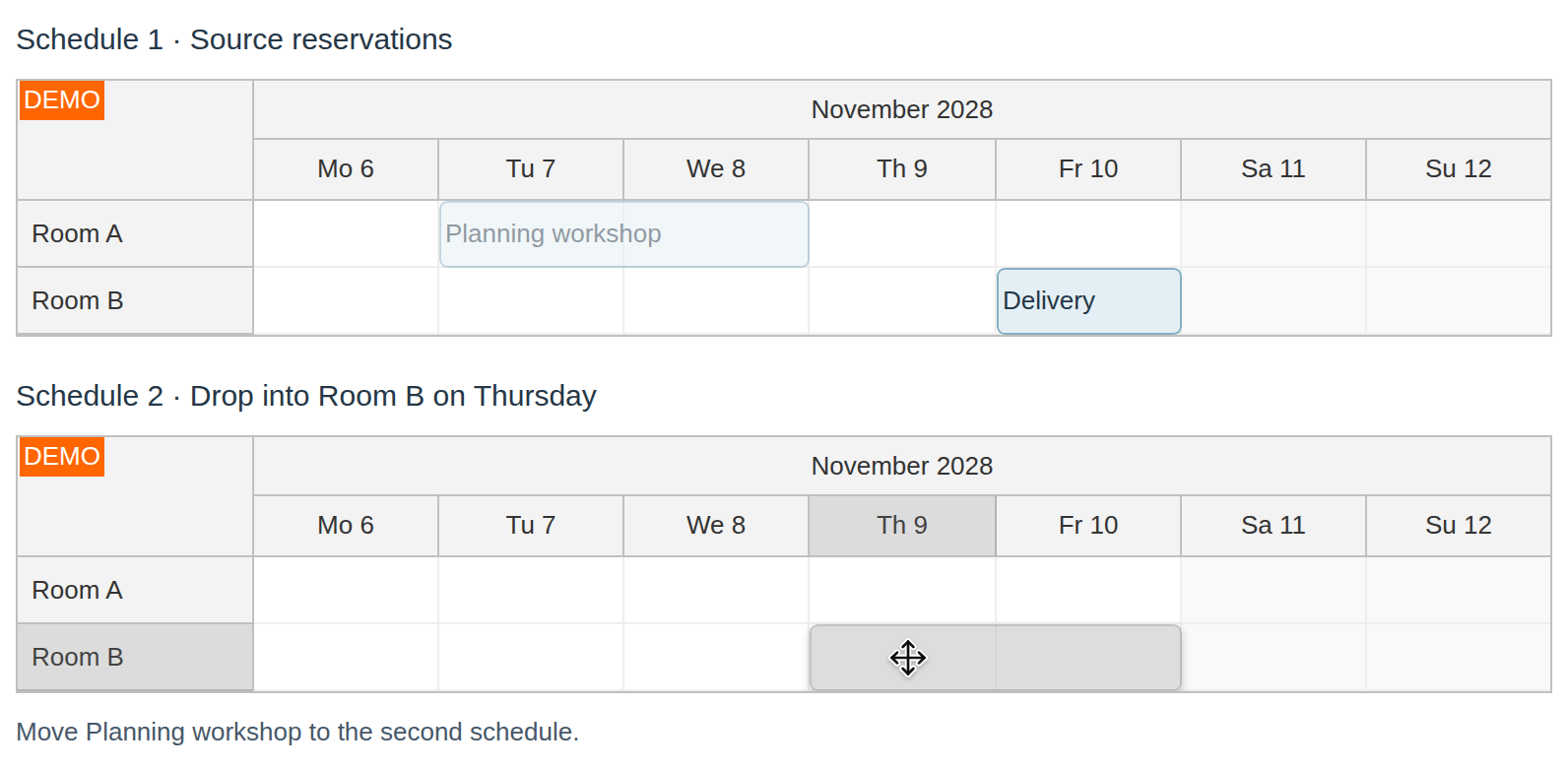
It is possible to drag events from one scheduler instance to another one in the same page.
This feature is disabled by default. It has to be enabled using dragOutAllowed property.
JavaScript
Example:
<div id="dp"></div>
<script type="text/javascript">
  var dp = new DayPilot.Scheduler("dp");
  dp.dragOutAllowed = true;
  // ...
  dp.init();
</script>
Demo:
API: heightSpec, height, dragOutAllowed.
The first Scheduler contains two reservations; the second starts empty. Both supply the same room IDs so a reservation can be dropped into a matching row in the other schedule.
The framework examples use DayPilot Pro. For installation, see the Angular, React or Vue Scheduler guide.
Angular
Bind the two components to config and secondConfig. The second configuration explicitly starts with an empty event array.
import {Component} from "@angular/core";
import {DayPilot, DayPilotModule} from "daypilot-pro-angular";

@Component({
  selector: "app-scheduler-example",
  standalone: true,
  imports: [DayPilotModule],
  template: `

    <daypilot-scheduler [config]="config"></daypilot-scheduler>
    <daypilot-scheduler [config]="secondConfig"></daypilot-scheduler>
  `
})
export class SchedulerExampleComponent {
  config: DayPilot.SchedulerConfig = {
    startDate: "2026-11-01",
    days: 30,
    scale: "Day",
    timeHeaders: [{groupBy: "Month"}, {groupBy: "Day", format: "d"}],
    resources: [{id: "A", name: "Room A"}, {id: "B", name: "Room B"}],
    events: [{id: 1, text: "Planning", resource: "A", start: "2026-11-03", end: "2026-11-06"}, {id: 2, text: "Delivery", resource: "B", start: "2026-11-08", end: "2026-11-11"}],
    heightSpec: "Fixed",
    height: 180,
    dragOutAllowed: true
  };
  secondConfig: DayPilot.SchedulerConfig = {
    startDate: "2026-11-01",
    days: 30,
    scale: "Day",
    timeHeaders: [{groupBy: "Month"}, {groupBy: "Day", format: "d"}],
    resources: [{id: "A", name: "Room A"}, {id: "B", name: "Room B"}],
    events: [],
    heightSpec: "Fixed",
    height: 180,
    dragOutAllowed: true
  };

}
React
Render two DayPilotScheduler components with individual props. Supply events={[]} to the second instance.
import React from "react";
import {DayPilot, DayPilotScheduler} from "daypilot-pro-react";

export default function SchedulerExample() {

  return <div>

    <DayPilotScheduler
      startDate={"2026-11-01"}
      days={30}
      scale={"Day"}
      timeHeaders={[{groupBy: "Month"}, {groupBy: "Day", format: "d"}]}
      resources={[{id: "A", name: "Room A"}, {id: "B", name: "Room B"}]}
      events={[{id: 1, text: "Planning", resource: "A", start: "2026-11-03", end: "2026-11-06"}, {id: 2, text: "Delivery", resource: "B", start: "2026-11-08", end: "2026-11-11"}]}
      heightSpec={"Fixed"}
      height={180}
      dragOutAllowed={true}
    />
    <DayPilotScheduler
      startDate={"2026-11-01"}
      days={30}
      scale={"Day"}
      timeHeaders={[{groupBy: "Month"}, {groupBy: "Day", format: "d"}]}
      resources={[{id: "A", name: "Room A"}, {id: "B", name: "Room B"}]}
      events={[]}
      heightSpec={"Fixed"}
      height={180}
      dragOutAllowed={true}
    />
  </div>;
}
Vue
Bind the second component to secondResources and secondEvents, while sharing the timeline settings declared in the script.
<script setup>
import {DayPilot, DayPilotScheduler} from "daypilot-pro-vue";

const startDate = "2026-11-01";
const days = 30;
const scale = "Day";
const timeHeaders = [{groupBy: "Month"}, {groupBy: "Day", format: "d"}];
const resources = [{id: "A", name: "Room A"}, {id: "B", name: "Room B"}];
const events = [{id: 1, text: "Planning", resource: "A", start: "2026-11-03", end: "2026-11-06"}, {id: 2, text: "Delivery", resource: "B", start: "2026-11-08", end: "2026-11-11"}];
const heightSpec = "Fixed";
const height = 180;
const dragOutAllowed = true;
const secondResources = [{id: "A", name: "Room A"}, {id: "B", name: "Room B"}];
const secondEvents = [];

</script>

<template>
  <div>

    <DayPilotScheduler
      :startDate="startDate"
      :days="days"
      :scale="scale"
      :timeHeaders="timeHeaders"
      :resources="resources"
      :events="events"
      :heightSpec="heightSpec"
      :height="height"
      :dragOutAllowed="dragOutAllowed"
    />
    <DayPilotScheduler
      :startDate="startDate"
      :days="days"
      :scale="scale"
      :timeHeaders="timeHeaders"
      :resources="secondResources"
      :events="secondEvents"
      :heightSpec="heightSpec"
      :height="height"
      :dragOutAllowed="dragOutAllowed"
    />
  </div>
</template>
ASP.NET WebForms
<DayPilot:DayPilotScheduler runat="server" id="DayPilotScheduler1"
  ...
  DragOutAllowed = "true"
/>
ASP.NET MVC
@Html.DayPilotScheduler("dps", new DayPilotSchedulerConfig {
  BackendUrl = ResolveUrl("~/Scheduler/Backend"),
  ...
  DragOutAllowed = true
})
Availability
Availability of this feature in DayPilot editions:
| Product | Lite | Pro |
|---|---|---|
| DayPilot for JavaScript | ||
| DayPilot for ASP.NET WebForms | ||
| DayPilot for ASP.NET MVC | ||
| DayPilot for Java |