 DayPilot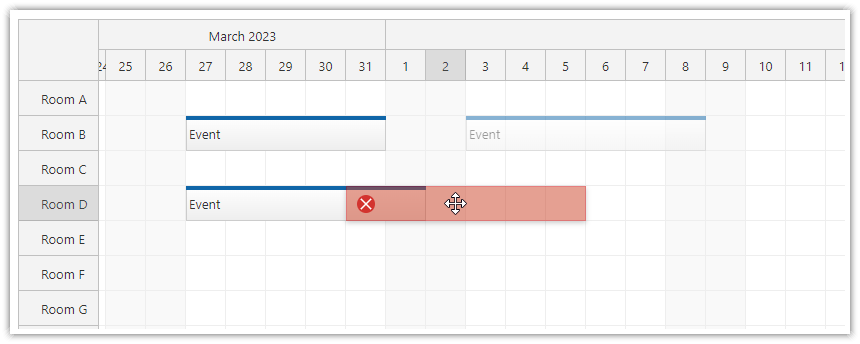
You can forbid event overlaps during drag and drop operations:
This option doesn't affect existing events.
JavaScript
To activate the overlap protection, use the allowEventOverlap property in the Scheduler config:
{
  allowEventOverlap: false,
  // ...
}
Demo
ASP.NET WebForms
<DayPilot:DayPilotScheduler
    ID="DayPilotScheduler1"
    runat="server"
    ...
    AllowEventOverlap="false"
    >
</DayPilot:DayPilotScheduler>
Demo
ASP.NET MVC
@Html.DayPilotScheduler("dps", new DayPilotSchedulerConfig {
  BackendUrl = Url.Action("Backend", "Scheduler"),
  // ...
  AllowEventOverlap = false
})
Demo
Availability
Availability of this feature in DayPilot editions:
| Lite | Pro | |
|---|---|---|
| DayPilot for JavaScript | ||
| DayPilot for ASP.NET WebForms | ||
| DayPilot for ASP.NET MVC | ||
| DayPilot for Java |